


Guide d'installation du combiné d'instruments numérique Passat B6
Ce guide étape par étape explique la compatibilité, la préparation à l'installation, les précautions de câblage, le transfert spécifique à la version et les réglages requis après installation pour certains véhicules de la plateforme PQ avec le combiné d'instruments mécanique d'origine.
Réessayez la traduction de l’anglais vers le français. Conservez inchangés les tokens de marque/modèle/spécifications, mais traduisez les mots ordinaires. Important : Veuillez confirmer l'année modèle exacte, le type de combiné d'origine, la structure du tableau de bord et la disposition du connecteur arrière avant l'achat ou l'installation. Cette amélioration est destinée aux véhicules compatibles de la plateforme PQ qui utilisent à l'origine un combiné à aiguilles mécanique.
Comment confirmer si ce combiné LCD convient à votre véhicule ?
Ce combiné d'instruments LCD complet est conçu pour certains Passat B6, Passat B7, et anciens CC applications sur le plateforme PQ. La décision d'ajustement correcte dépend de plus que du nom du véhicule. Le véhicule d'origine doit utiliser un combiné d'instruments à aiguilles mécaniques avec une structure de boîtier de tableau de bord correspondante et une disposition de connecteur arrière compatible.
Nous avons accompagné de nombreux propriétaires dans cette conversion spécifique de l'analogique au numérique. Bien que la technologie sous-jacente soit avancée, l'installation physique est en réalité très accessible. En suivant la simple séquence ci-dessous, vous obtiendrez un résultat parfait, de qualité OEM, directement dans votre propre garage.
Selon la configuration d'origine, la prise en charge peut également s'étendre aux versions conduite à droite, diesel et hybride. Pour les acheteurs à l'étranger, la méthode d'ajustement la plus fiable consiste à comparer ensemble l'année du véhicule, la forme d'origine du tableau de bord, le style d'origine du combiné et la disposition du connecteur arrière avant de commander.
Liste de contrôle des outils et de l'équipement nécessaires
Comme ce système dispose d'une architecture non destructive Plug-and-Play, vous n'aurez pas besoin de fers à souder ni de pinces coupantes. Avant de commencer l'installation, rassemblez simplement ces outils de base :
- Tournevis Torx T20 : Nécessaire pour retirer facilement les vis de fixation principales du combiné d'origine (une pointe magnétique est fortement recommandée pour éviter de laisser tomber la quincaillerie).
- Outils de dépose des garnitures en plastique : Indispensables pour retirer en toute sécurité la garniture de tableau de bord OEM sans rayer les éléments de finition de votre intérieur.
- Serviette en microfibre : À draper sur le cache de la colonne de direction, afin de protéger les plastiques pendant le retrait du boîtier.
- Bracelet antistatique (facultatif) : Bonne pratique recommandée pour manipuler en toute sécurité le PCB auxiliaire pendant le transfert.
En quoi cette mise à jour améliore-t-elle l'expérience de la grappe d'origine ?
Installation non destructive
Aucun perçage, aucune coupure de fil, aucun flash de l'ECU, et aucune modification des données d'origine du véhicule.
Système Linux stable
Conçu pour un démarrage rapide, un fonctionnement stable et une utilisation constante à long terme.
Écran HD de 10,3 pouces
Résolution de 1920 × 720 avec interfaces intégrées de style Volkswagen et Audi et prise en charge des commandes au volant.
Intégration de type OEM
Conçu pour préserver la logique des alertes, l'affichage des informations du véhicule et une apparence intérieure proche de l'origine.
Comment vérifier la compatibilité avant d'acheter ?
Avant de passer commande, les acheteurs doivent confirmer à la fois la spécification du véhicule et la structure physique du combiné d'instruments. C'est l'étape la plus importante pour éviter les erreurs de compatibilité.
Liste de vérification des spécifications du véhicule
- Confirmez l'année exacte du modèle
- Confirmez conduite à gauche ou conduite à droite
- Confirmez la version essence, diesel ou hybride
Liste de vérification de la structure du combiné d'instruments
- Confirmez que le combiné d'instruments d'origine est de type à aiguilles mécaniques
- Confirmez que la forme du boîtier du tableau de bord correspond
- Confirmez que la disposition du connecteur arrière correspond à la version prise en charge
Meilleure pratique d'installation pour les acheteurs internationaux
Le contrôle de compatibilité le plus précis repose sur l'année du véhicule, la photo du tableau de bord et la photo du combiné d'instruments d'origine ensemble. Cela réduit les erreurs d'installation, protège l'efficacité de l'installation et aide à éviter des litiges après-vente inutiles.
Comment la fiabilité de cet écran LCD a-t-elle été testée ?
Le résumé de test en anglais ci-dessous est basé sur le tableau de tests du produit. Il aide les acheteurs étrangers à comprendre les validations électriques, environnementales, anti-interférences et de durabilité réalisées pour ce combiné d'instruments LCD Volkswagen.
| Non. | Élément de test | Conditions de test | Résultat |
|---|---|---|---|
| 1 | Test de fonctionnement de base | Confirmez une à une toutes les fonctions de base. | PASSER |
| 2 | Test de la plage de tension de fonctionnement | Fonctionne normalement dans une plage d'alimentation de 9V à 16V. | PASSER |
| 3 | Test d'ondulation | 1. Test d'ondulation haute fréquence 2. Test d'ondulation basse fréquence | PASSER |
| 4 | Test de variation de puissance | Simulation des conditions de fluctuation de l'alimentation automobile. | PASSER |
| 5 | Test de décharge électrostatique | 1. Décharge d’air : État hors tension : 25KV État sous tension : 10KV 2. Décharge de contact : État hors tension : 15KV | PASSER |
| 6 | Stockage à basse température | Stocké pendant 48 heures dans un environnement à -40°C. | PASSER |
| 7 | Fonctionnement à basse température | Fonctionnement pendant 24 heures dans un environnement de -30°C. | PASSER |
| 8 | Fonctionnement à haute température | Fonctionnement pendant 24 heures dans un environnement à 70°C. | PASSER |
| 9 | Stockage à haute température | Stocké pendant 48 heures dans un environnement à 85°C. | PASSER |
| 10 | Test d’interférence électromagnétique (interférence d’interphone) | Aucune interférence avec l’unité testée pendant que l’interphone est actif. | PASSER |
| 11 | Test répété de mise sous tension/hors tension | Un million de cycles d’alimentation répétés. | PASSER |
| 12 | Test de stress logiciel | Test de stress sur les données CAN en continu. | PASSER |
| 13 | Test de stress en lecture/écriture sur DDR et Flash | Test de résistance du matériel de stockage en lecture/écriture. | PASSER |
Test de fonctionnement de base
Confirmez une à une toutes les fonctions de base.
Test de la plage de tension de fonctionnement
Fonctionne normalement dans une plage d'alimentation de 9V à 16V.
Test d'ondulation
1. Test d'ondulation haute fréquence
2. Test d'ondulation basse fréquence
Test de variation de puissance
Simulation des conditions de fluctuation de l'alimentation automobile.
Test de décharge électrostatique
1. Décharge d’air :
État hors tension : 25KV
État sous tension : 10KV
2. Décharge de contact :
État hors tension : 15KV
Stockage à basse température
Stocké pendant 48 heures dans un environnement à -40°C.
Fonctionnement à basse température
Fonctionnement pendant 24 heures dans un environnement de -30°C.
Fonctionnement à haute température
Fonctionnement pendant 24 heures dans un environnement à 70°C.
Stockage à haute température
Stocké pendant 48 heures dans un environnement à 85°C.
Test d’interférence électromagnétique (interférence d’interphone)
Aucune interférence avec l’unité testée pendant que l’interphone est actif.
Test répété de mise sous tension/hors tension
Un million de cycles d’alimentation répétés.
Test de stress logiciel
Test de stress sur les données CAN en continu.
Test de stress en lecture/écriture sur DDR et Flash
Test de résistance du matériel de stockage en lecture/écriture.
Comment préparer le véhicule avant de retirer le combiné d’instruments d’origine ?
Une bonne préparation est importante, car les problèmes d’installation commencent souvent avant même que le combiné d’instruments d’origine ne soit retiré. Les étapes suivantes doivent d’abord être effectuées pour garantir un processus fluide et sans erreur.
Étape 1 : Décharge de l'électricité statique
Avant le démontage et l'installation, éliminez l'électricité statique de votre corps. Lorsque vous manipulez la carte de circuits imprimés, tenez-la uniquement par les bords et évitez tout contact direct avec les composants électroniques.
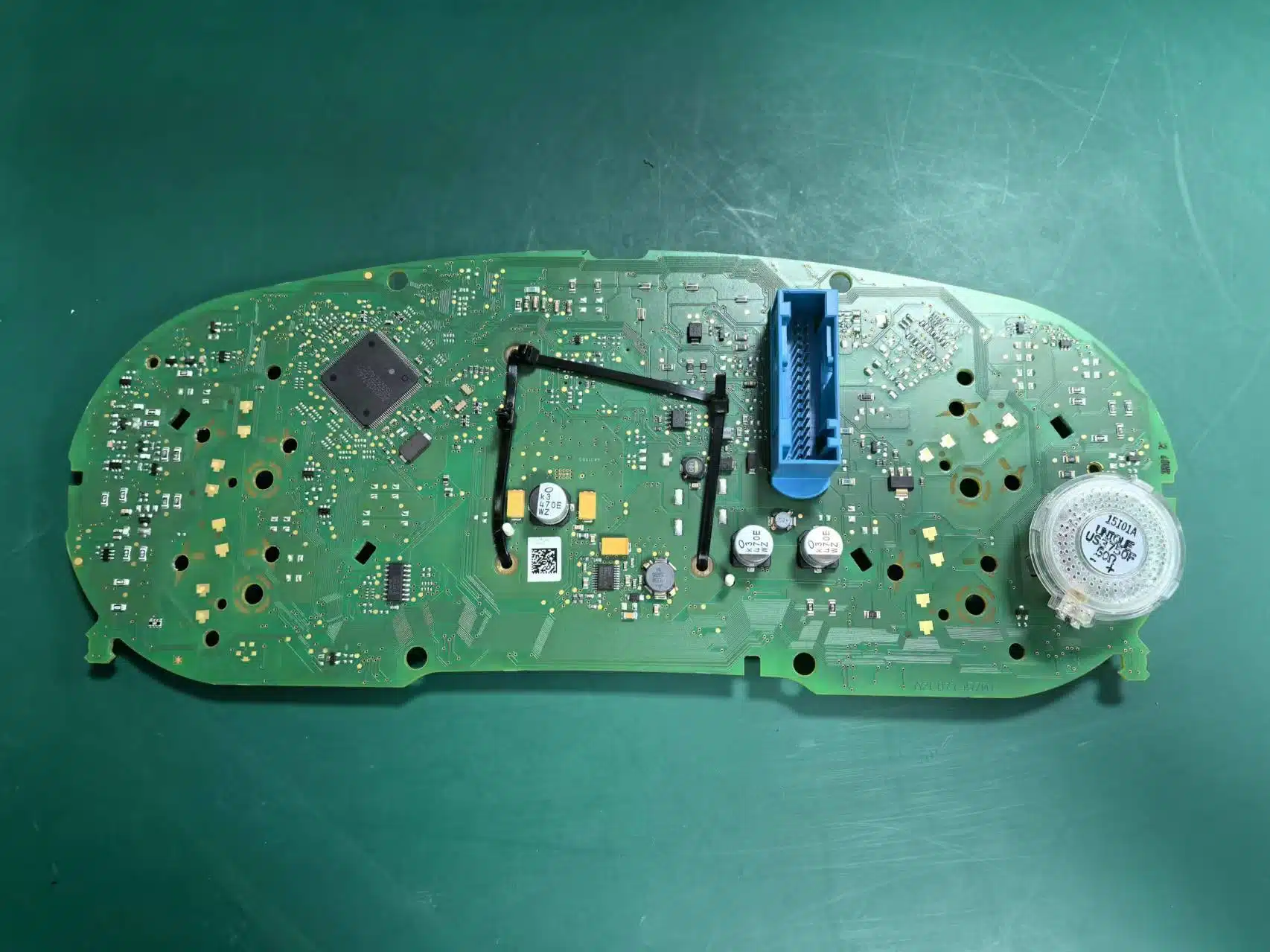
Étape 2 : Laisser le haut-parleur du combiné d’instruments d’origine en place
Le buzzer ou le haut-parleur du combiné d’instruments d’origine ne doit pas être retiré. Le retirer peut déclencher un avertissement de panne du combiné d’instruments.
Étape 3 : Ajuster les paramètres d'avertissement avant la suppression
Avant de retirer le combiné d’instruments d’origine, réglez d’abord l’alerte des pneus hiver et l’avertissement de vitesse à leurs valeurs maximales, puis désactivez ces deux fonctions dans le menu de l’écran multifonction. Cette étape doit être effectuée avant que le combiné d’instruments d’origine ne soit physiquement retiré.
Comment terminer la configuration initiale d’installation ?
Comment transférer la carte auxiliaire sur certains combinés haut de gamme ?
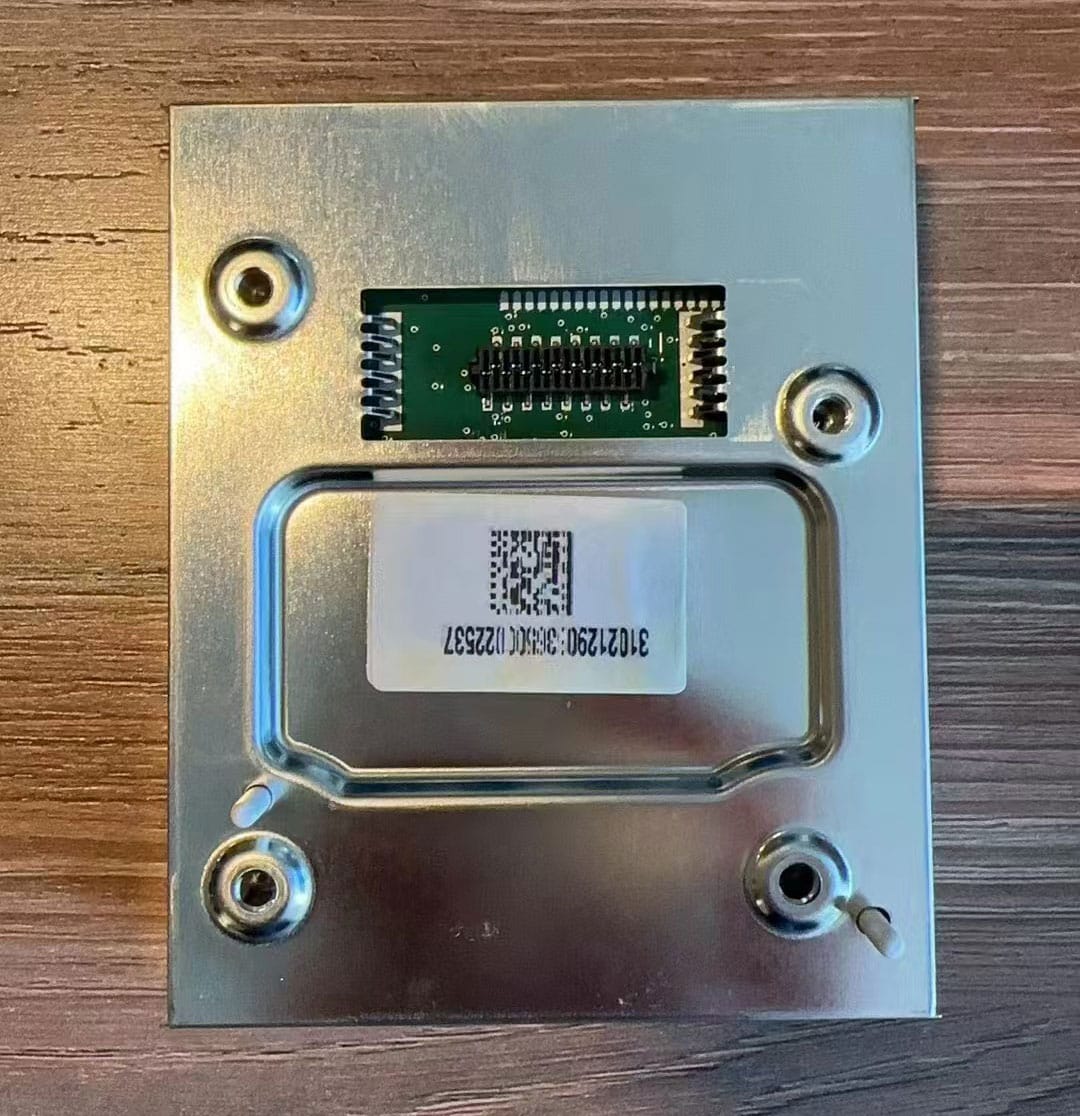
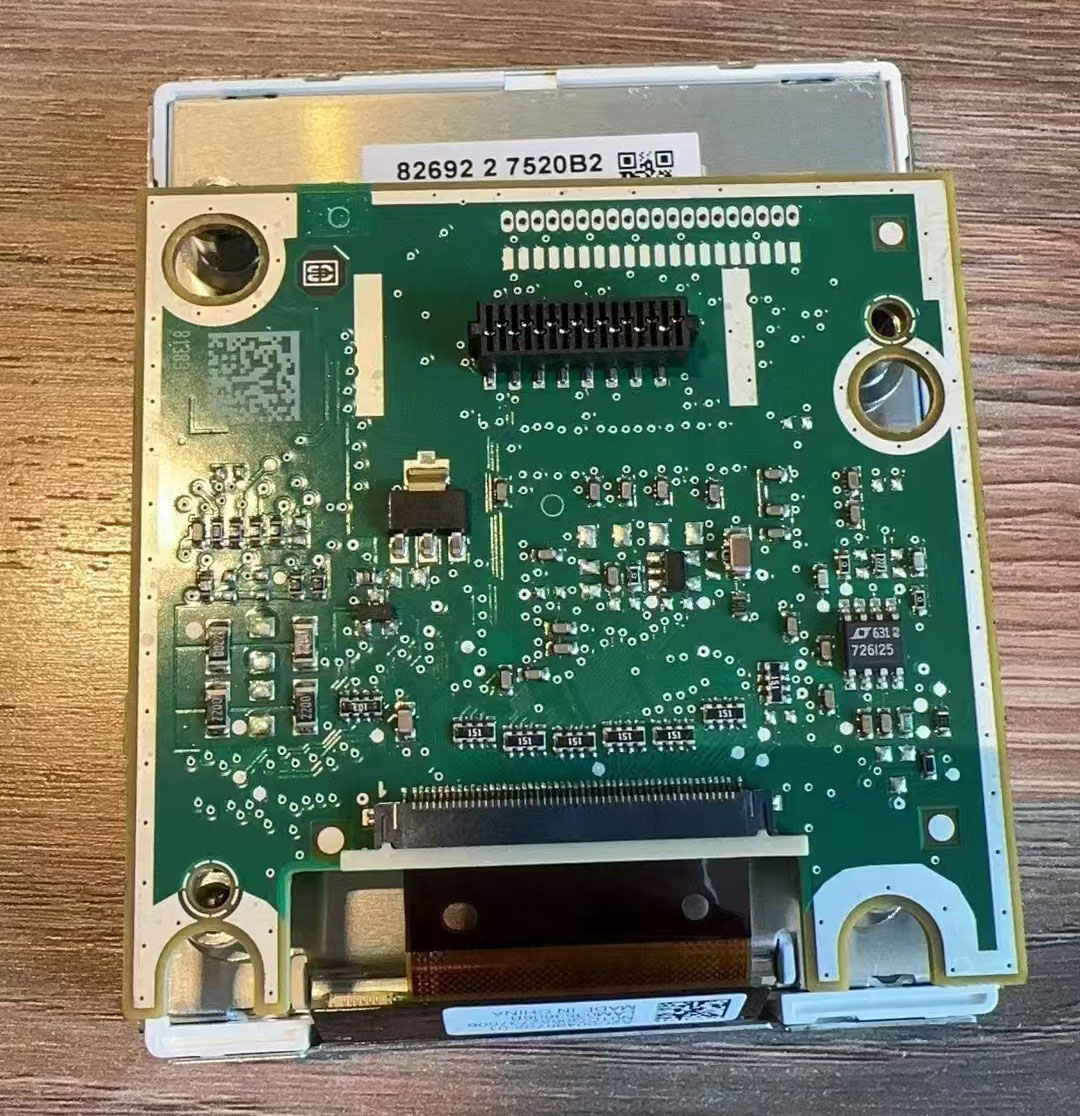
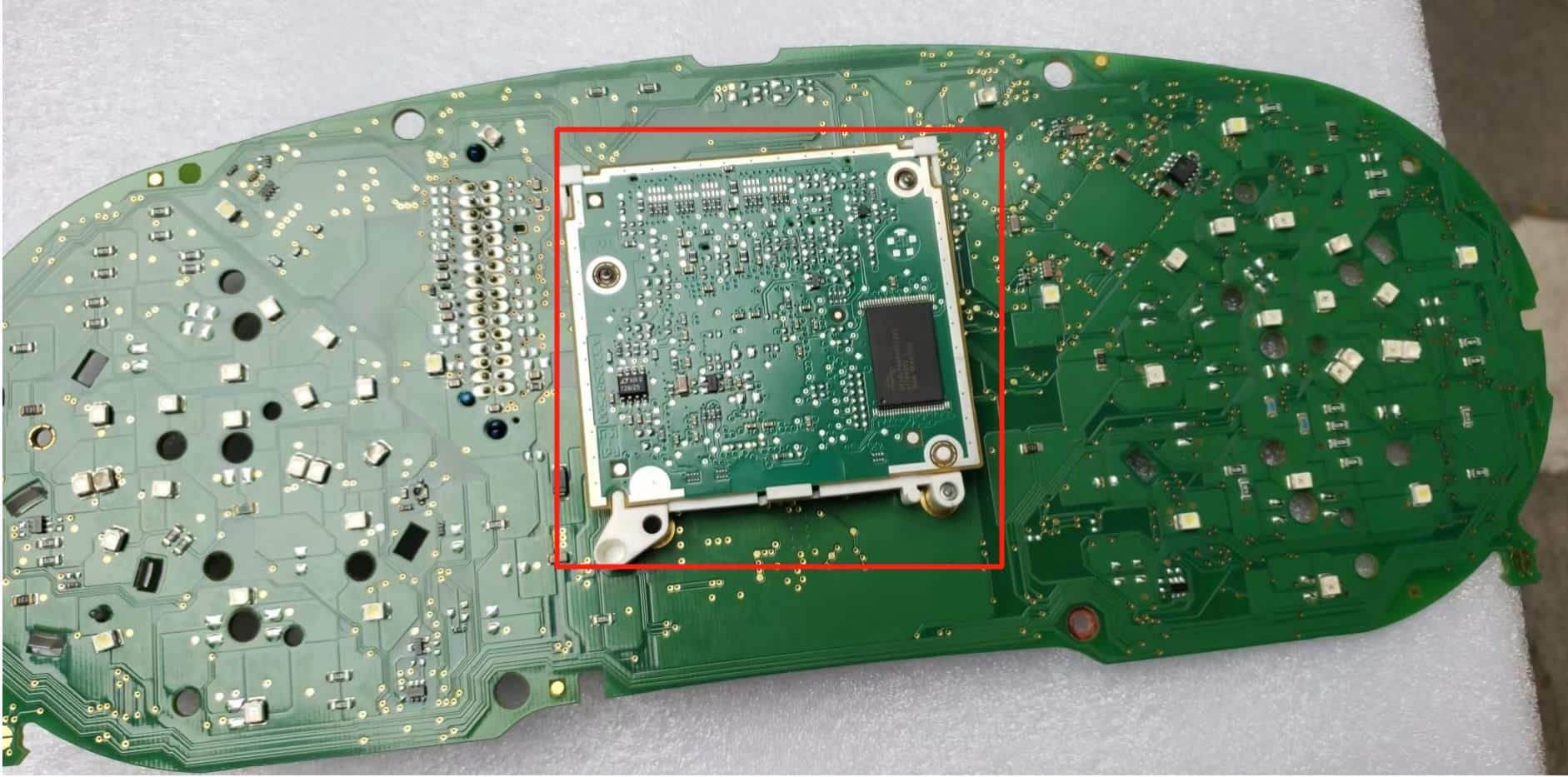
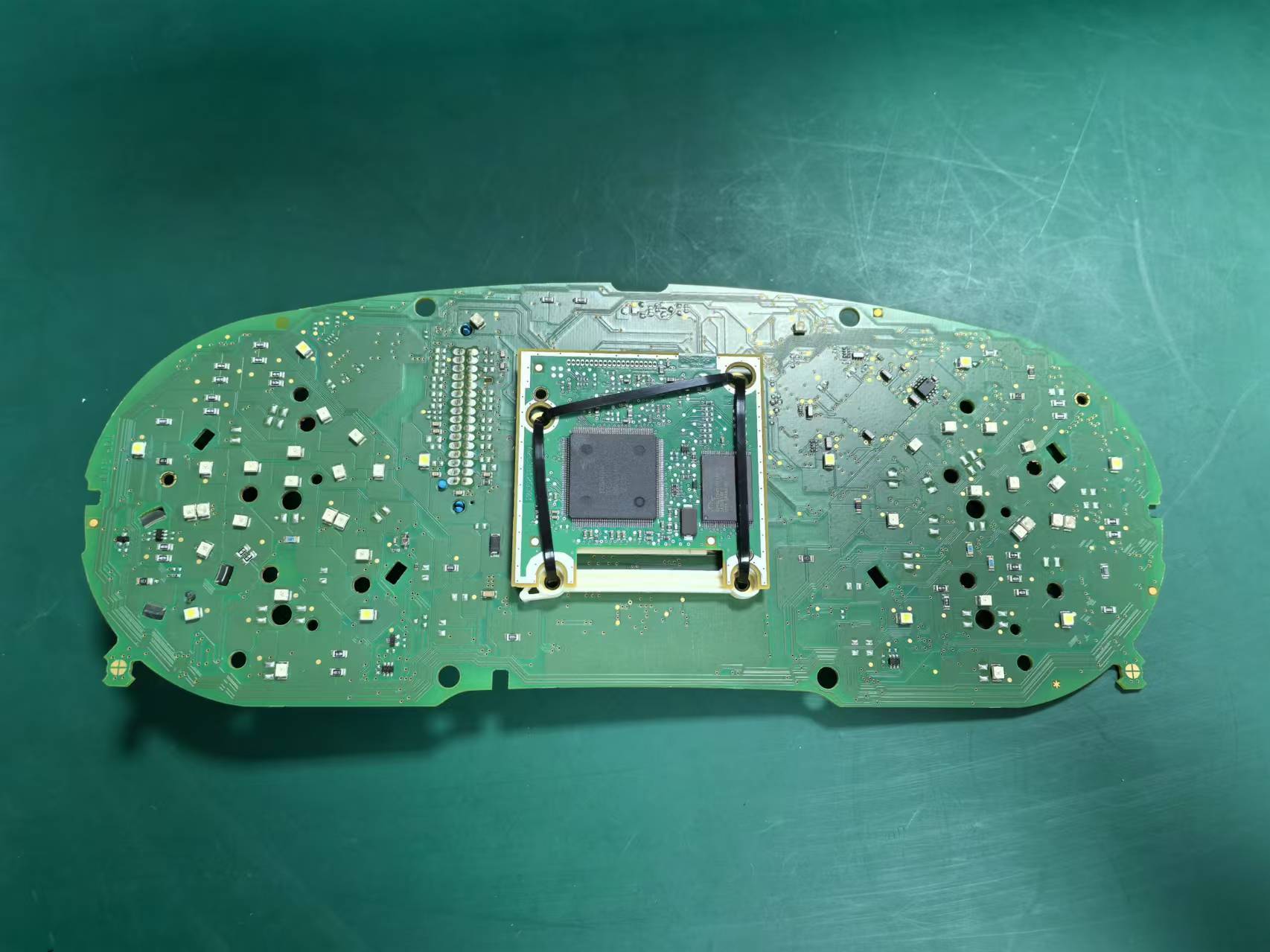
Certains combinés mécaniques d’origine plus haut de gamme incluent une petite carte de circuit imprimé supplémentaire derrière le petit écran d’origine. Si votre combiné d’origine possède cette carte, elle doit être transférée et fixée correctement à l’intérieur du nouveau combiné LCD pendant l’installation.
Si cette carte est absente, mal installée ou oubliée lors de l’assemblage, l’indication du niveau de carburant peut devenir inexacte et le combiné peut afficher un avertissement de défaut. Si le combiné d’origine n’inclut pas cette carte, cette étape n’est pas nécessaire. Ne vous inquiétez pas, le transfert est un processus simple plug-and-play ne nécessitant aucune compétence avancée.
Comment acheminer correctement les câbles USB ?
Le combiné LCD comprend deux câbles USB : un pour une utilisation limitée de mise à niveau du système et un pour l'utilisation du miroir d'écran. Ces câbles doivent être acheminés proprement et placés dans le compartiment de rangement sous le côté gauche du volant afin que l'installation reste propre, accessible et cohérente avec une finition de style OEM.
Comment réparer une jauge à carburant qui n'affiche pas le plein après l'installation ?
Si le réservoir de carburant est plein après l'installation mais que la jauge n'atteint pas le niveau maximal, la capacité du réservoir de carburant doit être calibrée dans les paramètres du système. Il s'agit d'un problème de configuration et il convient de le vérifier avant de supposer un problème matériel.
Etapes de l'étalonnage de la jauge de carburant
- Remplissez complètement le réservoir de carburant.
- Conduisez le véhicule sur quelques centaines de mètres.
- Entrez dans le menu des données de conduite.
- Ouvrez la section des quantités rechargeables.
- Lisez la quantité de recharge restante qui y est indiquée.
- Saisissez cette valeur dans Paramètres → Calibrage de configuration → Capacité du réservoir de carburant.
- Lorsque la valeur est correcte, la quantité rechargeable devient nulle et la jauge de carburant s'affiche normalement.
Comment résoudre les problèmes d'affichage des clignotants après l'installation ?
Sur la plateforme PQ, l'option de lumière physique dans les paramètres ne doit pas être activée. Si elle est activée, l'indicateur de clignotant peut ne pas s'afficher correctement. Ce paramètre doit être vérifié chaque fois que le comportement de l'affichage semble anormal après l'installation.
Comment corriger l’affichage graphique du véhicule ?
Si le graphique du véhicule affiché dans l'interface ne correspond pas à la voiture réelle, rendez-vous à l'adresse suivante Paramètres → Sélection du modèle de véhicule, Choisissez le bon modèle, puis coupez le contact, verrouillez le véhicule et attendez quelques minutes pour que le changement s'applique.
Questions fréquemment posées
Ce tableau de bord LCD nécessite-t-il une découpe des fils pour l’installation ?
Non. L’installation utilise un faisceau plug-and-play non destructif, ce qui signifie que vous n’avez pas besoin d’épissurer ou de couper le câblage d’origine.
Le codage VCDS ou le flashage de l’ECU est-il nécessaire ?
Aucun codage complexe ni flashage de l’ECU n’est nécessaire. Le firmware est conçu pour communiquer automatiquement avec la passerelle de votre véhicule pour les fonctions standard.
Comment vérifier la compatibilité pour ma Passat ou ma CC ?
Vérifiez que votre véhicule d’origine est équipé d’un combiné à aiguilles mécaniques, qu’il correspond aux années de modèle prises en charge et qu’il est conforme à la structure physique du tableau de bord indiquée dans notre guide d’ajustement.
Les versions LHD (conduite à gauche) et RHD (conduite à droite) sont-elles identiques ?
Non, elles ne sont pas interchangeables en raison de la forme physique de la garniture du tableau de bord. Vous devez commander exactement la version correspondant à l’orientation de votre volant.
Les voyants d’avertissement OEM fonctionneront-ils toujours correctement ?
Oui. Le protocole est conçu pour conserver intégralement la logique essentielle des voyants d’avertissement, les alertes de porte ouverte et les informations d’origine du module de commande de carrosserie (BCM).
Pourquoi ma jauge de carburant est-elle inexacte après l’installation ?
Cela est généralement dû au fait que la capacité du réservoir de carburant doit être calibrée dans les paramètres d’affichage, ou que (pour les modèles haut de gamme) la carte auxiliaire d’origine n’a pas été correctement transférée.








Add comment