


Audi Q3 Digital Cluster Buying Guide: Love Your 2012–2018 Q3 Again
You Still Love Your Q3. It's the Dashboard That Feels Dated.
The first-generation Q3 still looks unmistakably Audi from the outside. It fits into city parking spaces, feels familiar on the motorway and handles the everyday jobs you bought it for. Then you get behind the wheel and look at the original instruments.
If that older driver's display is the one part of your Q3 you'd like to change, an OEM-style digital cluster can make a surprisingly visible difference without replacing the entire vehicle.
This Audi Q3 Digital Cluster Buying Guide explores what that upgrade feels like in daily use, which navigation options are possible and how iKAGOO helps turn the display you want into a configuration matched to your Q3 8U.
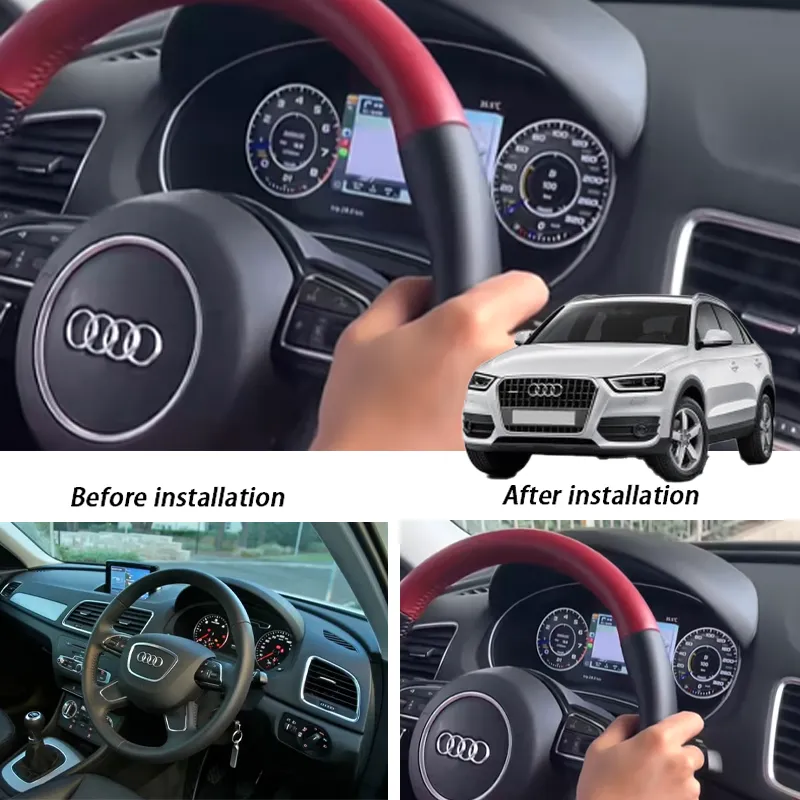
Your Q3 Still Feels Like an Audi. Why Should Its Cockpit Feel Old?
You've probably never needed a digital dashboard just to drive to work. The original instruments already tell you how fast you're going. That's not really why owners consider this upgrade.
It's the experience of getting into a car you still enjoy, starting the engine and seeing a driver's display that belongs to an earlier era. A well-kept Q3 8U may have years of useful life ahead. Its instrument area doesn't have to define how old the whole cabin feels.
Keep the compact SUV that fits your life. Refresh the view you see on every drive.
An OEM-style digital cluster changes the original gauge area rather than adding an unrelated screen to the dashboard. For someone who appreciates Audi's understated interior design, that distinction matters.
It's also where choosing the right supplier matters. iKAGOO reviews the dashboard, original instrument shape, bezel and connection details to prepare the matched Q3 kit. You're choosing a specific retrofit for your vehicle, not just a digital screen that looks convincing in a photograph.
The Real Appeal of an Audi Q3 Virtual Cockpit Upgrade
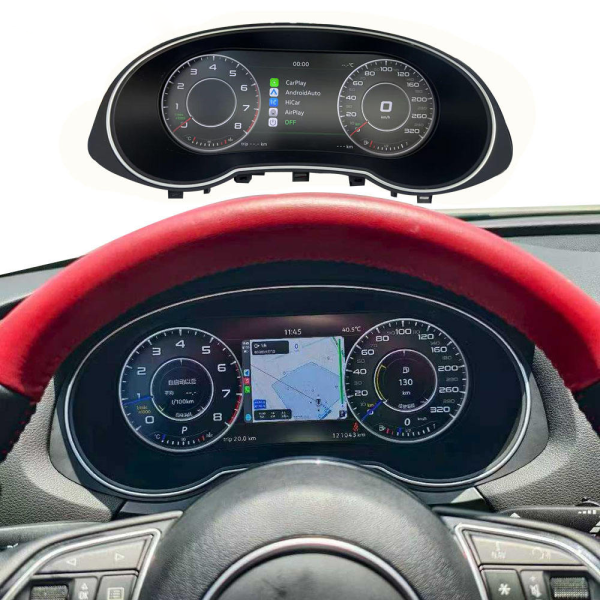
The point of a digital cluster isn't to put the largest possible screen into an older dashboard. It's to give the original driver's position a more modern presentation.
Imagine opening the door before the morning commute. The steering wheel and familiar Audi controls are still there, but the instrument area now has a clean digital appearance. Speed, engine RPM and supported vehicle data appear in a contemporary layout.
iKAGOO provides a vehicle-specific preparation route rather than treating every Q3 dashboard as identical. That is what connects the appearance you like in the installation photo with a practical route for your own car.
When the Road Is Unfamiliar, a Digital Cluster Becomes More Than an Interior Upgrade
Picture a weekend drive from London towards the Lake District, or a journey from Munich into the Alps. You're enjoying the Q3 you already know, but this time you'd like compatible route information in the instrument display instead of relying entirely on the center screen.
The iKAGOO Q3 cluster offers supported navigation-oriented views and synchronized content with compatible source equipment. Depending on the selected configuration, that can bring route information closer to the driver's normal line of sight.
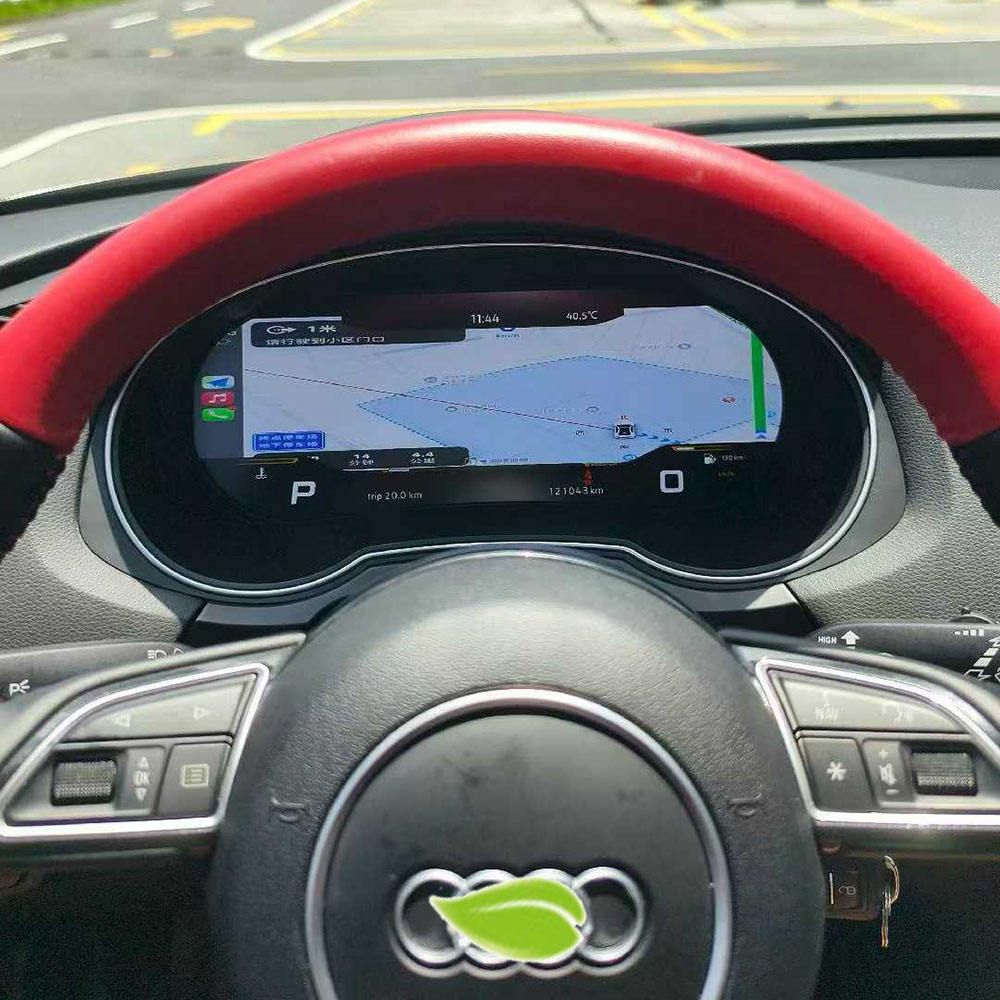
Can the Audi Q3 8U Digital Cluster Display CarPlay or Android Auto Maps?
It can display supported synchronized content with an equipped kit and a compatible source system. It does not mean every original Audi MMI system automatically supports full CarPlay or Android Auto map mirroring.
This is precisely where iKAGOO's preparation service becomes valuable. Tell us which original radio or Android head unit you have and which navigation function you're trying to achieve. The available interface and display route can then be reviewed before you choose the final configuration.
If you also want a larger center screen, explore the iKAGOO Audi Q3 Android head unit . That is a separate infotainment upgrade; the digital cluster focuses on the driver's instrument area. A combined setup requires compatibility confirmation.
Want this view in your own Q3?
Explore the YB-123 instrument cluster and confirm your original infotainment system before selecting a navigation configuration.
Night Drives, Digital Gauges and a Cockpit That Feels More Personal
During the day, a digital cluster is an obvious visual upgrade. At night, the choice of instrument layout and display style becomes part of the cabin's atmosphere.
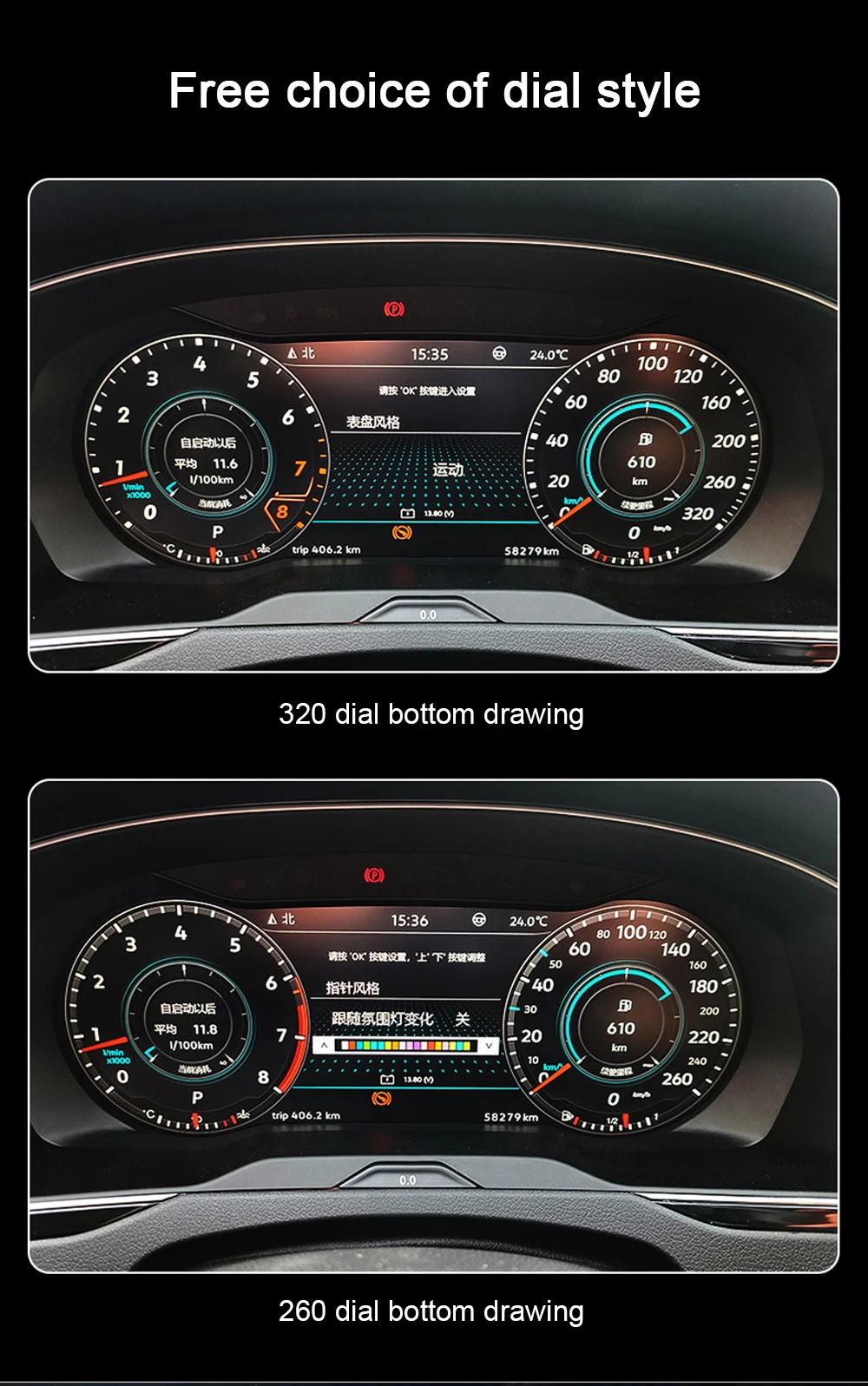
Some owners prefer familiar-looking classic dials. Others want a sportier digital arrangement or a supported navigation-oriented view for longer trips. The Q3 cluster's available display modes let you choose an instrument style that suits the journey.
The aim isn't to make the driver's display more distracting. It's to create a modern, legible presentation of the information your vehicle actually supports.
iKAGOO shows the available interface styles and prepares the cluster for the matched vehicle configuration. That makes the buying decision about a real product and its supported displays, not an exaggerated rendering of an unrelated Audi cockpit.
Audi Q3 Digital Cluster or Android Head Unit: Which Upgrade Matches What You Want?
The two upgrades change different parts of the driving experience. Understanding that distinction makes it easier to choose where to invest first.
iKAGOO supplies both product categories and can review the intended configuration. Instead of buying one component and discovering later that it doesn't provide the display you imagined, you can identify your preferred result first.
The existing Audi Q3 Android screen installation guide explains the separate center-screen upgrade process.
Will the 10.25-inch Digital Cluster Fit Your 2012–2018 Audi Q3?
The iKAGOO YB-123 is intended for supported first-generation Audi Q3 8U configurations from 2012 to 2018. The original instrument, dashboard, bezel, connector and steering position determine the appropriate configuration.
The Q3 is sold internationally under the Audi brand, but owners and parts listings describe the same first-generation vehicle in different ways.
| Market / terminology | Names to recognize when identifying the correct vehicle |
|---|---|
| Germany & Austria | Audi Q3 Typ 8U, erste Generation, Q3 8U Facelift, with applicable TDI, TFSI, S line and quattro variants. |
| UK & Ireland | First-generation Audi Q3, Audi Q3 8U, Q3 SE, S line and quattro. Right-hand-drive dashboard details must be provided. |
| France, Belgium & Switzerland | Audi Q3 8U, première génération, Q3 phase 1 and phase 2 / facelift where applicable. |
| Italy & Spain | Audi Q3 prima generazione / primera generación, Q3 8U, with market-specific trim and engine descriptions. |
| Netherlands & Scandinavia | Audi Q3 8U, first-generation or local-language equivalents, including applicable facelift models. |
| US & Canada | First-generation Audi Q3, including applicable Premium, Premium Plus, Prestige and quattro versions. Local market model-year availability differs from Europe. |
| Australia, New Zealand & other markets | Audi Q3 8U, first-generation Q3 and Q3 facelift. Confirm the original market, dashboard and steering position. |
| China & other Asian markets | Audi Q3 8U / 第一代奥迪Q3 and corresponding local first-generation listings. Confirm the original vehicle, not simply the market name. |
S line, TDI, TFSI and quattro names do not establish instrument compatibility by themselves. RS Q3, previously modified vehicles and unusual instrument configurations require individual review.
iKAGOO uses the original cluster, dashboard, bezel and connector photographs, together with the vehicle year and steering position, to establish the appropriate kit. For the general matching process, read the digital-cluster compatibility guide .
A New Digital Display Without Giving Up the Functions You Use
A new instrument panel should make the driver's seat feel more enjoyable, not leave you wondering what happened to your original controls. Supported steering-wheel operation, driving data and warning information are part of the matched Q3 configuration.
Original mileage, immobilizer-related information and particular factory functions depend on the original instrument and installation route. Original data, PCB/module handling or coding may be necessary on a specific vehicle.
iKAGOO reviews these requirements as part of vehicle-specific preparation. That helps you approach the upgrade with a clearer understanding of what your installer needs to preserve and verify.
Learn more about the importance of supported original-function integration in the iKAGOO factory-function retention standard .
What Will It Take to Install a Digital Cluster in Your Q3?
The Q3 YB-123 uses a vehicle-specific matched connection route for supported configurations. Installation includes removing the original cluster, fitting the new display, connecting the appropriate harness and interface, configuring the supported functions and testing the result.
Confirm the original Q3
Supply the year, market, dashboard, original cluster, bezel, connector and steering-position information.
Match the intended result
Clarify factory functions and, if wanted, the supported navigation synchronization route.
Fit, configure and test
Follow the confirmed procedure, including any necessary original-data work or coding, and verify agreed functions.
How much does an Audi Q3 digital cluster upgrade cost?
The total depends on the current product price, destination, installation labour, any necessary original-instrument work and, if selected, additional equipment for synchronized navigation. The official Q3 product page provides the current hardware offer.
An accurate configuration matters more than a low initial price if you intend to enjoy the upgraded cockpit for years. iKAGOO provides a matched kit and installation guidance rather than asking you to assemble an unverified combination of parts.
Le iKAGOO installation planning guide explains when professional installation is appropriate.
Why Choose iKAGOO for Your Q3 Digital Cockpit Upgrade?
Finding a screen with an attractive interface is the easy part. What matters after that is whether it belongs in your Q3, supports the functions you expect and comes with help when it's time to install it.
If you've compared digital clusters across different online sellers, the cost of choosing a cluster without after-sales support is worth considering. For vehicle-specific electronics, the purchase doesn't end when the box is delivered.
Audi Q3 Digital Cluster Buying Guide: Questions Owners Ask Before Ordering
Is a digital cluster worth buying for a 2012–2018 Audi Q3?
It can be a worthwhile cockpit upgrade if your first-generation Q3 still suits your needs and you want a more modern driver's display. The upgrade changes the instrument area you see on every drive. iKAGOO helps match the configuration to the actual vehicle before the final order.
Can my 2018 Audi Q3 use this 10.25-inch cluster?
Yes, if it is a supported first-generation Audi Q3 8U. The second-generation Q3 F3 arrived in 2018, so registration year alone is insufficient. Original dashboard and instrument photographs identify the relevant version.
Can the Q3 digital cluster show Google Maps, Apple Maps or Waze?
Supported navigation content depends on the selected source system and compatible interface. Full-screen navigation layouts are available on supported configurations, but every phone app and wireless connection method is not automatically guaranteed. iKAGOO reviews your specific navigation requirement.
Do I need an Android head unit to use navigation on the cluster?
It depends on the navigation content you want and your existing infotainment system. A digital cluster and an Android head unit serve different purposes. iKAGOO can review the compatible connection route before you order one or both products.
Will I retain the original mileage and steering-wheel controls?
Supported steering-wheel functions and vehicle data are retained on the correctly matched setup. Original mileage, immobilizer-related functions and any necessary PCB or module handling depend on the vehicle-specific installation procedure.
Is the Audi Q3 8U digital cluster plug-and-play?
The kit uses a matched connection route for supported Q3 configurations, but installation still includes setup and testing. Some vehicles require original-data work or coding. iKAGOO helps clarify the appropriate procedure for the confirmed configuration.
Is the cluster suitable for UK or Australian right-hand-drive Q3s?
Right-hand-drive compatibility must be confirmed for the actual dashboard and selected kit. Provide the steering-position, original cluster and dashboard photographs. If a complete head-unit-and-cluster configuration is required, availability must be confirmed before purchase.
Where can I buy the correct Audi Q3 8U digital cluster?
Le official iKAGOO YB-123 product page provides the 10.25-inch cluster for supported 2012–2018 Q3 8U configurations. Submit the original vehicle information for preliminary compatibility review, select the appropriate configuration and place your order. iKAGOO performs a stricter final compatibility review before shipment.
Your Q3 Has Plenty Left to Give. Make Every Drive Feel More Modern.
If the first-generation Q3 still fits your life, an OEM-style digital cluster gives you a new way to enjoy the driver's seat without replacing the whole SUV.
The iKAGOO 10.25-inch Q3 cluster combines a contemporary instrument display with supported driving data and navigation possibilities. More importantly, iKAGOO helps identify the right version, clarify the original-function and connection requirements, and support the installation.
iKAGOO — Precision Fit. Premium Design. Professional Upgrades.








Add comment
Vous devez vous connecter pour publier un commentaire.