


Mise à niveau du cockpit numérique VW Golf Mk6 : synchronisation de la carte CarPlay, vues commutables et un siège conducteur qui semble à nouveau neuf
Une Golf Mk6 bien entretenue peut encore être exactement la voiture que vous voulez posséder. Le gabarit fonctionne, la position de conduite est familière, et une GTI ou Golf R peut encore rendre un trajet ordinaire agréable.
Puis vous regardez à travers le volant et les instruments analogiques d'origine vous rappellent immédiatement de quelle génération vient l'habitacle.
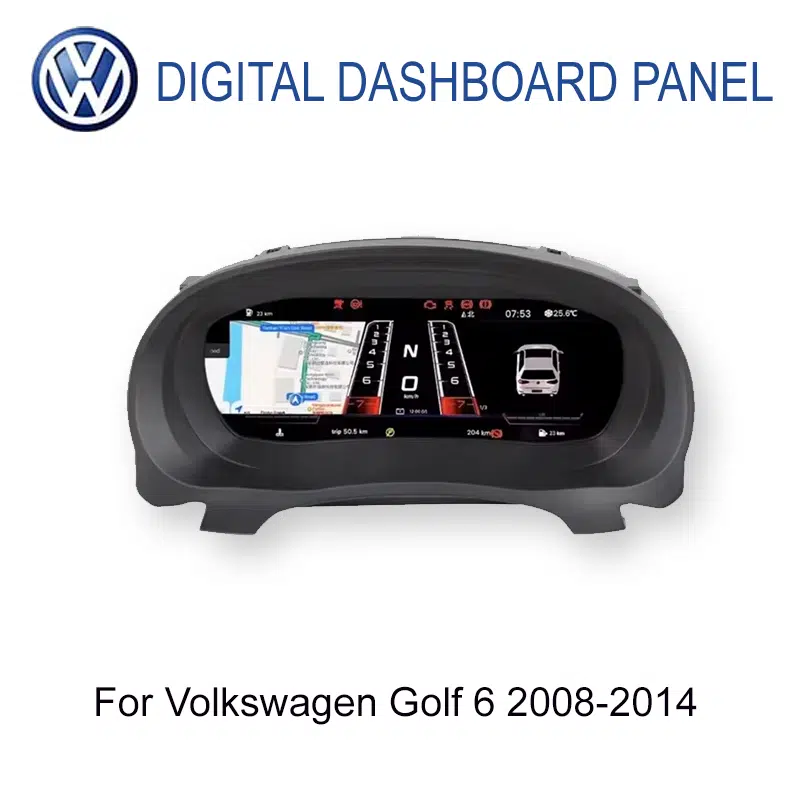
A Mise à niveau du cockpit numérique Golf Mk6 change cette vue avec un cockpit LCD de 12.3 pouces, des affichages d'instruments commutables, des données du véhicule d'origine prises en charge et—sur la route correctement appariée—CarPlay et synchronisation de la carte directement dans l'affichage des instruments.
La mise à niveau du cockpit numérique Golf Mk6 en vaut-elle la peine ?
Pour un propriétaire de Golf 6 de 2008–2014 qui utilise régulièrement la voiture et prévoit de la garder, cela peut être une excellente mise à niveau car elle modernise la partie de l'habitacle que vous voyez à chaque trajet, vous permet de basculer entre les vues d'instruments disponibles, garde les informations de conduite prises en charge devant vous et peut ajouter l'affichage CarPlay/carte via la route multimédia appariée.
C'est particulièrement convaincant lorsque la Golf elle-même semble toujours juste mais que la zone des instruments analogiques fixes semble désormais plus ancienne que le reste de la voiture.
Qu'est-ce qui fait réellement paraître vieux le combiné d'origine de la Golf Mk6 ?
Les instruments d'origine de la Golf 6 n'étaient pas mal conçus. Les affichages multifonctions Volkswagen de finition supérieure montraient déjà des informations utiles de trajet et de véhicule. Le problème est ce qui se passe après une nouvelle décennie de possession : des informations utiles sont encore présentées dans une disposition d'instruments en grande partie fixe.
La voiture peut paraître plus jeune que le tableau de bord.
Une bonne Mk6 peut encore sembler rigide et familière sur la route, mais les deux grands cadrans mécaniques et la petite zone d'information centrale rendent l'âge du cockpit évident à chaque démarrage.
La voiture d'origine connaît déjà des informations utiles—mais l'espace d'affichage est limité.
Les informations de trajet, les données de carburant et l'état du véhicule peuvent déjà exister dans le système d'origine. La limitation est la part de ces informations qui doit tenir dans l'affichage central relativement petit entre les jauges analogiques fixes.
La même disposition d'instruments vous suit dans tous les types de conduite.
Le compteur de vitesse et le compte-tours d'origine font leur travail, mais ils ne changent pas, que ce soit pour un trajet quotidien, un long parcours autoroutier ou une balade du week-end dans votre GTI ou Golf R.
Vous avez peut-être déjà un CarPlay moderne au centre—et une vue de l'époque 2010 devant vous.
Mettre à niveau la radio ou l'écran central résout la connectivité téléphonique, la musique et la navigation, mais cela ne change pas directement le combiné d'instruments juste derrière le volant.
Pouvez-vous changer librement l'affichage du cockpit numérique de la Golf Mk6 ?
Oui. Les paramètres d'instrument disponibles et les vues d'affichage peuvent être commutés depuis le menu du combiné.
Cela change l'expérience de possession plus qu'une fiche technique ne le suggère. Le combiné d'origine de la Golf vous donne une structure visuelle de base unique chaque jour. Un cockpit numérique vous permet de choisir la présentation disponible en fonction de ce que vous voulez voir.
La documentation produit actuelle inclut différents styles de cadrans et modes tels que des dispositions épurées pour le quotidien, axées sur la navigation et de style sport. Les graphismes exacts disponibles dépendent de la version du système fournie.
Pourquoi cela compte-t-il dans l'usage quotidien ?
Parce que la personnalisation ne devient significative que lorsque vous la voyez de façon répétée.
Le lundi matin, vous pouvez vouloir un affichage propre et simple. Lors d'un trajet plus long, vous pouvez préférer une disposition qui rend d'autres informations plus visibles. Si vous appréciez le côté visuel de la conduite de votre Golf, pouvoir changer à nouveau le cockpit plus tard évite que la mise à niveau ne ressemble à une autre pièce de remplacement fixe.
C'est la différence entre remplacer un vieux combiné et offrir au conducteur un cockpit configurable.
Cela signifie aussi que la mise à niveau ne dépend pas entièrement de CarPlay ou de la navigation pour se justifier. Même lorsque vous connaissez l'itinéraire et que votre téléphone reste dans votre poche, l'affichage conducteur lui-même a changé.

Le cockpit numérique de la Golf Mk6 prend-il en charge CarPlay et la synchronisation des cartes ?
Oui. Le parcours Golf Mk6 pris en charge peut afficher les informations liées à CarPlay et synchroniser le contenu de navigation compatible vers l'affichage des instruments lorsque le bon parcours multimédia et de connexion est associé.
Cela ne signifie pas que le combiné est une unité centrale Android ou qu'il crée CarPlay de manière indépendante. La connexion téléphonique, la sortie de l'unité centrale et le chemin d'affichage du combiné doivent encore fonctionner ensemble.
Pourquoi est-ce utile si vous avez déjà un écran central ?
Because the centre screen and the instrument display do different jobs.
The centre screen remains the better place for the full CarPlay interface, music, calls and the complete map. The cluster can bring useful route information closer to the same area where you already check speed and driving data.
That becomes useful on an unfamiliar motorway exit, a sequence of city turns, a hotel entrance at night or any drive where you would rather not keep shifting attention back toward the centre display.
What Does This Upgrade Change During a Normal Week?
You know the route. You still see the cockpit.
Most commuting days do not need navigation at all. You start the Golf, check fuel and speed, and drive the same road you already know.
That is why the visual upgrade matters: it does not need a special occasion to be useful. The new driver view is already there before you leave the driveway.
Now CarPlay and map sync become practical rather than decorative.
You still have the full navigation interface on the centre display, while the correctly matched cluster route can bring compatible map information into the driver's display.
The benefit is not “two CarPlay screens.” It is putting useful route information closer to where your eyes already go during the drive.
You feel like taking the longer road home.
A fixed analogue cluster looks the same whether you are stuck in traffic or actually enjoying a quiet road in a GTI or Golf R.
Being able to switch the available display presentation gives the cockpit a little more of the same personality that keeps many owners interested in the car itself.
The difference becomes harder to ignore at night.
The instrument area is one of the main illuminated surfaces in the driver's view. A full digital display therefore changes the perceived age of the cockpit much more than another small interior accessory.
Speed, fuel, vehicle status and route information stay relevant for hours.
On a longer motorway drive, the value is not about pressing more buttons. It is about having the vehicle information you repeatedly use organised inside a more modern driver display for the whole journey.
If the engine, gearbox, seats, size and practicality still work for you, changing the whole vehicle simply to gain a newer cockpit is a very different decision from changing the cockpit itself.
A digital instrument cluster will not pretend a 2010 or 2012 Golf is a new car. It does something more realistic: it updates one of the parts of the cabin you interact with on every single journey.
For an owner who expects to keep the Mk6 another three, four or five years, that repeated daily value is one of the strongest reasons the upgrade makes sense.
Will the Digital Cockpit Still Show the Golf's Original Driving Information?
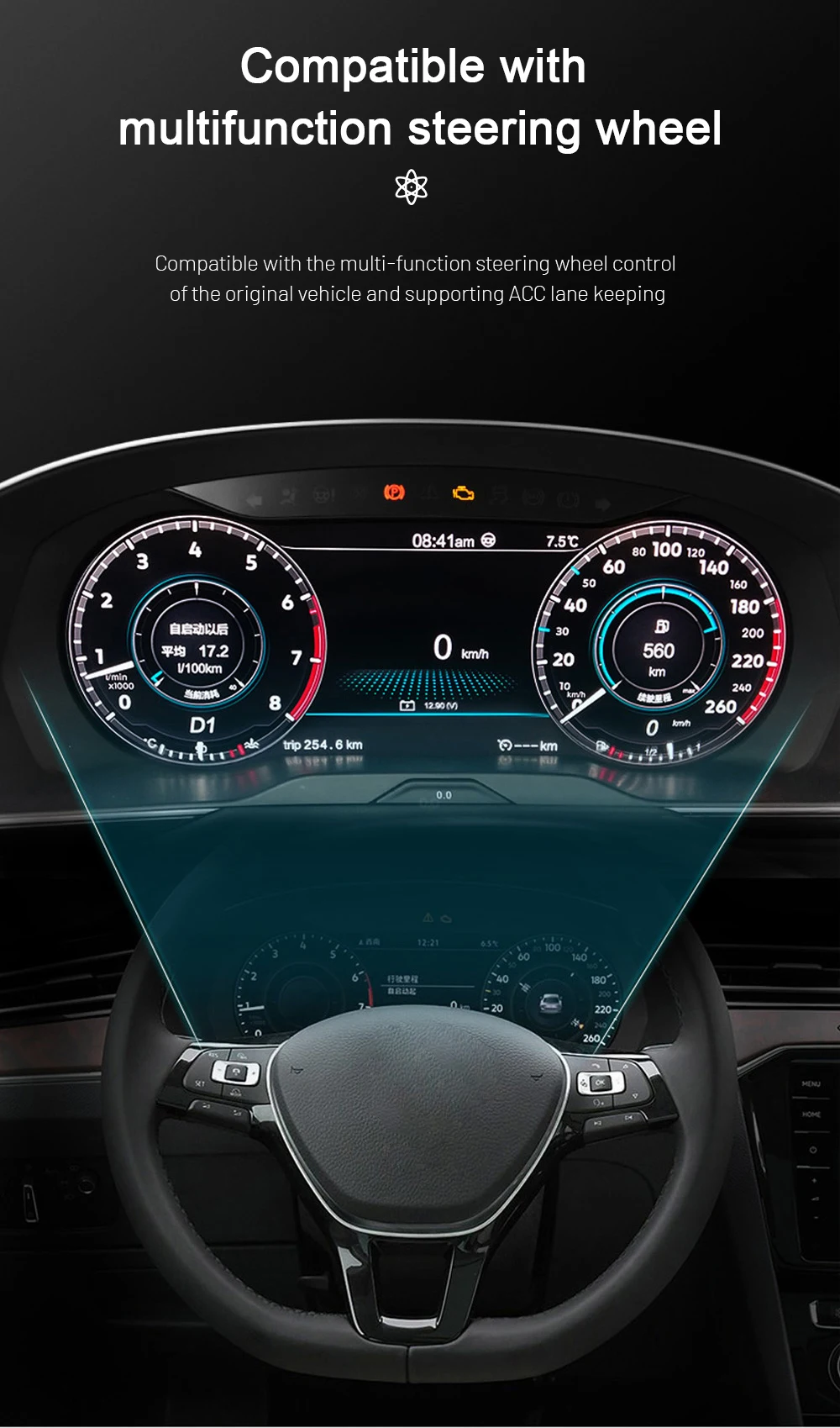
Yes, on the correctly matched configuration. The current Golf 6 route retains supported everyday driving information instead of turning the instrument area into a decorative LCD screen.
Supported driving-status and warning information remain available after correct connection and setup, and supported multifunction steering-wheel interaction is retained through the appropriate vehicle-interface route.
This matters because the best-looking display is still a poor upgrade if it stops behaving like an instrument cluster.
The iKAGOO matching process therefore looks at the actual original cluster, steering side, connector configuration and expected functions—not only the words “Golf Mk6” on the order.
Which 2008–2014 Golf 6 Models Can Use This Digital Cockpit?
The current product range covers Volkswagen Golf 6 / Golf Mk6 / Golf VI / Typ 5K vehicles from 2008–2014. There is an important evidence boundary between the product range and the currently documented installation procedure.
The current product route also checks LHD/RHD configuration and body-style differences. A model badge or production year alone is therefore useful for starting the match, but it is not the final preparation decision.
You do not need to treat this as a reason to delay the purchase indefinitely. The normal process can be: choose the product and place the order, provide the requested year, LHD/RHD and original-cluster information, then let the stricter final configuration review happen before the unit is prepared and dispatched.
What Does a Real Golf Mk6 Digital Cluster Installation Involve?

This is a proper dashboard retrofit, not a clip-on accessory. The original cluster and surrounding trim have to be handled carefully, and the relevant retained components, connectors, settings and functions need to be checked before final reassembly.
For the matched supported route, intentional cutting of the original factory wiring is not part of the normal installation plan. That does not make it a five-minute job; dashboard handling and complete final testing still matter.
The practical difference of the supported iKAGOO route is that your installer can start with a Golf 6-specific reference. If the actual frame, connector or behaviour differs from the documented route, the sensible next step is to stop and verify the difference rather than force the installation.
Three Checks That Matter Before You Spend the Money
These are the current Golf 6 product results. They answer three different buyer questions: is the upgrade worth doing, how closely can the route match the original car, and how seriously should the installation be treated?
Very strong if this is a Golf you intend to keep
The score is high because the original instrument area is one of the clearest visual age points in the Mk6, the new cockpit is visible every drive, supported vehicle information remains useful, the display can be changed to suit the driver, and CarPlay/map display can add another recurring benefit on the correct route.
It stops short of 99 because a healthy original analogue cluster still performs its basic job well. If you love the factory gauges or will sell the car soon, the upgrade becomes more preference than necessity.
Strong vehicle-specific fit without pretending every Golf is identical
The Golf-specific dashboard route, retained vehicle-data direction, steering-wheel support, connector matching and real PQ installation evidence create a strong compatibility case.
It is not presented as 100/100 because regional versions, LHD/RHD, body style, original cluster structure, connector route, previous modifications and map-display requirements can change the final configuration.
A real retrofit that deserves a competent installer
The matched route does not plan intentional factory-wire cutting, but the job still requires dashboard trim removal, original-cluster handling, matched connections, configuration and full function testing.
An experienced DIY installer may be comfortable with L3 work. For most owners, an automotive-electronics installer is the easier choice. If the cluster frame or connector differs from the documented route, stop before forcing parts together.
Why Doesn't It Make Sense to Treat Every Golf Mk6 Digital Cluster as the Same Product?
Because the part you can compare most easily—the LCD screen—is not the part that usually creates the difficult questions.
The difficult part is whether the correct cluster arrives for the actual Golf, whether the original information and controls behave as expected, whether the CarPlay/map route matches the installed multimedia system, and whether somebody can still identify the product later if your installer needs help.
If all you need is the lowest-priced screen and you are comfortable solving those questions yourself, cheaper marketplace listings exist. iKAGOO is intended for owners who want the hardware and the support route to remain connected.
Eligible hardware is covered by the current 12-month limited hardware warranty. After the commercial warranty period, troubleshooting, software guidance, parts support and repair coordination may still be available; out-of-warranty costs can apply.
Useful Guides Before You Upgrade
Golf Mk6 Digital Cockpit Upgrade FAQ
Is a Golf Mk6 digital cockpit upgrade worth it?
It can be a strong upgrade for a Golf 6 you drive regularly and intend to keep. The cockpit changes every journey, the available display views can be switched, supported vehicle information remains available, and the correctly matched route can add CarPlay and map synchronization to the instrument display.
If you prefer the original analogue instruments or expect to sell the Golf soon, leaving it original can make more sense.
Does the Golf Mk6 digital cockpit support CarPlay?
Yes, on the supported matched connectivity route. CarPlay-related information can be displayed through the appropriate phone-link or connected multimedia path.
The cluster is not an Android head unit or independent CarPlay box, so the installed head unit, cluster version and interconnection route still matter.
Can Google Maps, Waze or Apple Maps be synchronized to the Golf 6 instrument cluster?
Compatible navigation content can be displayed in the cluster when the required multimedia and projection route is present. Google Maps, Waze or Apple Maps availability therefore depends on the source system and connection route, not simply on the LCD screen itself.
If map synchronization is one of your main reasons for buying, include the centre-screen/head-unit information with the order so the appropriate route can be checked.
Can I freely switch the Golf Mk6 digital cockpit parameters and display views?
Yes. The available instrument parameters and display views can be changed from the cluster menu. The current product route includes multiple style directions, including cleaner everyday, navigation-focused and sport-style displays where supported by the supplied version.
The exact graphics and available options follow the confirmed system version, so not every marketing image should be interpreted as a promise that every version has the identical menu.
What years does the Golf Mk6 digital cockpit support?
The current product range covers Golf 6 / Golf Mk6 / Golf VI / Typ 5K models from 2008–2014. The detailed published PQ installation guide currently documents the 2009–2014 route, so 2008 vehicles should have the original cluster frame and connector arrangement matched before final preparation.
Will speed, RPM, fuel, trip information and warning data still display?
Oui, sur l'itinéraire correctement sélectionné. Current Golf 6 product documentation confirms supported speed, RPM, fuel, trip, driving-status and warning information after correct connection and setup.
Will the multifunction steering-wheel controls still work?
Supported multifunction steering-wheel interaction remains available on the matched vehicle-interface route. Exact menu behaviour can vary with the original Golf configuration, so it should be included in final function testing before dashboard reassembly.
Is this an Android instrument cluster?
Non. This product is a dedicated LCD digital instrument cluster for the Golf 6 dashboard. It should not be confused with an Android head unit or a universal Android tablet installed behind the steering wheel.
Is this a factory Volkswagen OEM Virtual Cockpit retrofit?
Non. It is an aftermarket iKAGOO LCD digital cockpit designed for an OEM-style Golf 6 installation direction. It should not be described as an original factory-coded Volkswagen Virtual Cockpit.
Does the digital cluster fit a Golf Mk6 GTI or Golf R?
GTI and Golf R are included in the documented 2009–2014 Golf 6 PQ installation coverage when the original cluster/frame matches the supported route. The final match still uses the actual original cluster, dashboard and connector configuration rather than the GTI or R badge alone.
What about Golf Variant, Estate, Wagon or Cabriolet?
Golf Cabriolet is included in the documented 2009–2014 PQ installation route. Variant, Estate and Wagon versions are part of the current product fitment review, but their body-style name alone is not enough to confirm the exact dashboard and connector route.
Do I need to cut the original Golf wiring?
Intentional cutting of supported factory wiring is not planned on the normal matched route. The retrofit still involves trim removal, original-cluster handling, matched connections, configuration and final testing. Previous wiring modifications or unusual connectors should be disclosed before final preparation.
Can I install the Golf 6 digital cluster myself?
The current iKAGOO Installation Ease result is L3 — Advanced DIY. An experienced DIY installer with automotive-electronics experience may be comfortable with the work, but many owners will prefer a professional automotive-electronics installer because the original cluster and dashboard have to be handled carefully.
Why buy a Golf Mk6 digital cluster from iKAGOO instead of a cheaper marketplace listing?
The LCD hardware is only one part of the retrofit. The vehicle year, steering side, original cluster, connector route, expected retained functions, CarPlay/map-display requirement, installation reference and later technical support all affect whether the upgrade becomes a usable result.
iKAGOO keeps those items connected to the order so the buyer is not expected to solve the entire vehicle-specific route alone after the parcel arrives.
Do I have to complete a compatibility check before I can order?
Not as a default barrier. You can select the product and place the order, then provide the requested Golf year, LHD/RHD information and original-cluster/dashboard photos. The vehicle-specific review takes place before final product preparation and dispatch.
If the car has previous dashboard or wiring modifications, or you need a specific CarPlay/map synchronization route, supplying those details early helps the correct configuration be prepared.
Quel support est disponible après l'installation ?
The original order remains the reference for installation questions, troubleshooting, supported software guidance, compatible parts and repair coordination. Eligible hardware currently carries a 12-month limited hardware warranty. Support can continue after the warranty period, although out-of-warranty parts, repairs or shipping may involve additional cost.
Keep the Golf You Still Enjoy. Upgrade the View You See Every Day.
A Mise à niveau du cockpit numérique Golf Mk6 does not make sense because there is something inherently wrong with analogue gauges.
It makes sense when the Golf itself still deserves to stay in your driveway, but the driver's view no longer feels like the car you want to sit in for the next several years.
The 12.3-inch display changes that view. The available instrument parameters and modes can be switched. Core supported vehicle information remains part of the cockpit. And with the correctly matched route, CarPlay and compatible map information can move into the driver display as well.
If you choose iKAGOO, the next step is not simply “buy a screen and hope it fits.” The product, vehicle information, display requirement, installation reference and later support remain connected to the same order.
Product range: Volkswagen Golf 6 / Golf Mk6 / Golf VI / Typ 5K 2008–2014. The detailed published PQ installation route currently documents 2009–2014 vehicles; 2008 vehicles require original-cluster/frame and connector matching before final preparation. CarPlay and map synchronization depend on the confirmed cluster, multimedia source and connected display route.








Add comment
Vous devez vous connecter pour publier un commentaire.