Thème XStore

No products in the cart.

Jusqu'à 23%
  • Ford Raptor Digital Cluster pour F150 2009-2014 | 13.1" Linux Virtual Cockpit
  • 12
  • 02 1
  • 07
  • Cluster de type cockpit virtuel
  • Cluster de type cockpit virtuel
  • 05 1

Ford Raptor Digital Cluster pour F150 2009-2014 | 13.1″ Linux Virtual Cockpit

Marque :
(1 avis client)

De : $1,380.00

Hors taxes UE et USA uniquement
Détails
Sécurisé par PayPal
Service de prépaiement de l'impôt DDP

Nous nous occupons de la TVA et des droits de douane. Économies estimées : $120-$280.

États-Unis (48 États)AutricheBelgiqueBulgarieCroatieChypreTchécoslovaquieDanemarkEstonieFinlandeFranceAllemagneGrèceHongrieIrlandeItalieLettonieLituanieLuxembourgMaltePays-BasPolognePortugalRoumanieSlovaquieSlovénieEspagneSuède
ou

Vous avez des questions ?

N'hésitez pas à Prendre contact

Payer en toute sécurité avec Paypal Payer en toute sécurité avec Visa Payer en toute sécurité avec Master Card Payer en toute sécurité avec JCB Payer en toute sécurité avec American Express Payer en toute sécurité avec Alipay Payer en toute sécurité avec Google pay Payer en toute sécurité avec Klarna Payer en toute sécurité avec DISCOVER Payer en toute sécurité avec Apple Pay
Garantie d'un paiement sûr et sécurisé Checkout
Protection de l'acheteur iKAGOO

Protection des achats pour ce produit

Vérification de la compatibilité, paiement sécurisé, suivi de la livraison et service après-vente efficace.

Les conditions d'éligibilité, les délais de signalement et les mesures correctives dépendent de la politique iKAGOO applicable et de l'examen au cas par cas.

Consulter les politiques de protection

2009–2014 F-150 · 2010–2014 SVT Raptor

Modern Digital View for Your Ford Raptor Digital Cluster Dashboard

Le présent Tableau de bord numérique de la Ford F150 2009-2014 upgrades the original analog gauge area into a 13.1-inch Linux virtual cockpit. It supports original vehicle data, multiple Raptor-style UI themes, steering-wheel control operation, CarPlay / Android Auto map information display and map mirroring from a compatible Android head unit.

13.1-inch HD IPS 1920 × 932 Linux · Fast Start Six OEM-Style UI Themes CarPlay / Android Auto Map Display Données d'usine conservées Commandes au volant No Intended Wire Cutting
Check My Truck First

iKAGOO prepares the correct 2009–2012 or 2013–2014 cluster version, connection solution and installation guidance from your vehicle information.

Best suited to:

F-150 and SVT Raptor owners who want a full digital driver display, original vehicle information, off-road UI themes and phone navigation information shown in the instrument area while keeping the original dashboard style.

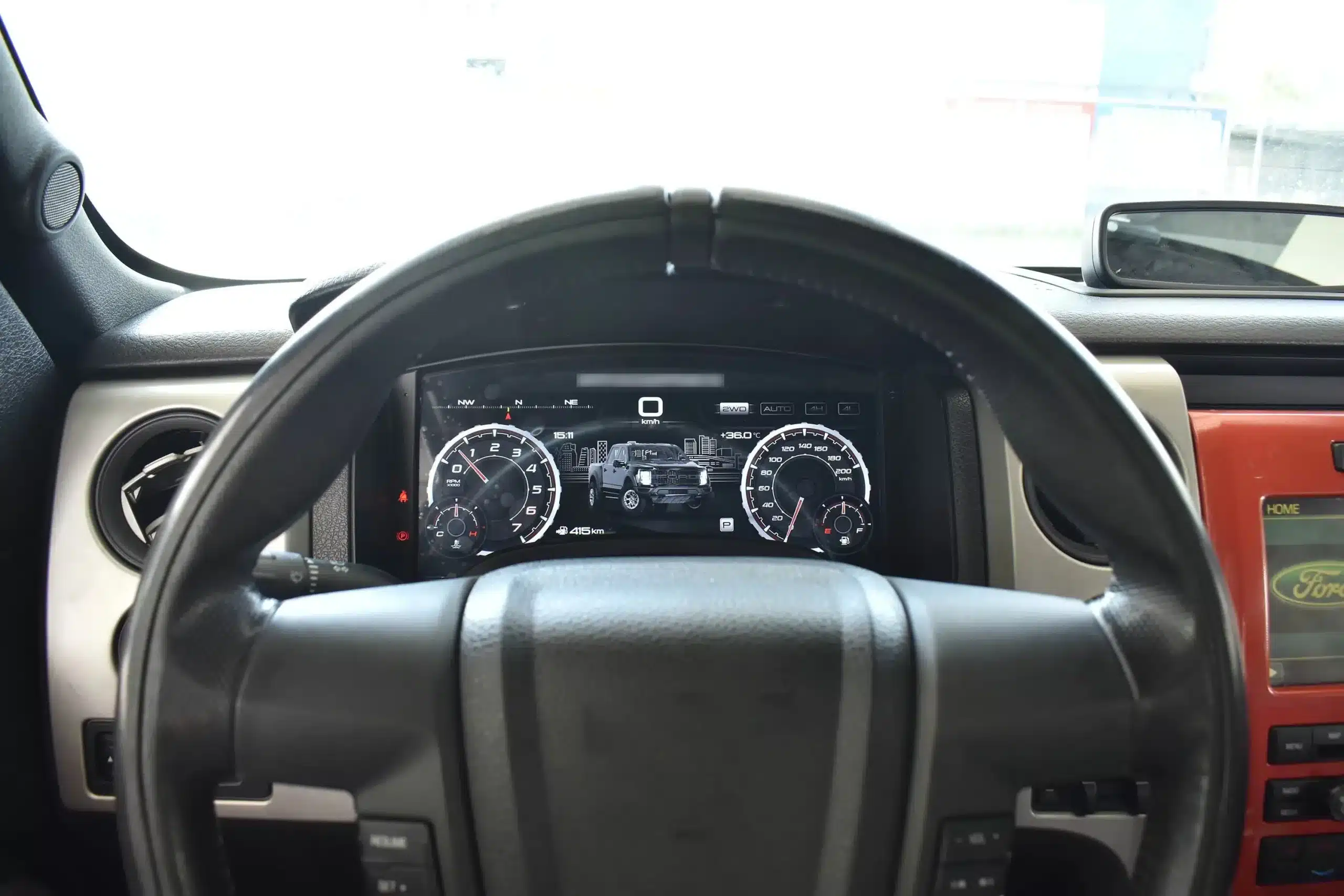
Installed Driver’s View

The large digital display fits inside the original cluster position, giving the truck a modern cockpit view without making the dashboard look like a cheap universal screen installation.

2009-2014 Ford F150 digital instrument cluster installed behind the steering wheel
Réponse rapide
This is a vehicle-specific digital instrument cluster for 2009–2012 and 2013–2014 Ford F-150 dashboard layouts, including the 2010–2014 first-generation SVT Raptor when the original cluster structure matches. It upgrades the driver display and can show supported original vehicle data, CarPlay / Android Auto map information and Android head unit map mirroring when the connected system supports it.

Daily-Use Improvement

Why This Ford F150 Digital Dash Upgrade Feels Meaningfully Newer

The strongest value is not only the screen size. The upgrade changes how you read speed, RPM, tire pressure, oil information, fuel data, navigation direction and off-road status during normal driving.

Clearer Driving Data

Speed, RPM, gear position, fuel range, oil information, water temperature, TPMS and supported warnings are easier to read than on the original analog layout.

CarPlay / Android Auto Map Display

When paired with the compatible source system, the cluster can show phone navigation and Android head unit map information in the driver’s display area, reducing the need to look away from the road.

Raptor-Style UI Modes

The interface includes multiple visual themes for city driving, speed-focused driving, snow, sand, desert and drivetrain-focused views, making the upgrade feel closer to a modern Raptor cockpit.

Fonctions d'usine conservées

Original Vehicle Information and Driver Controls Continue to Work

With the correct year version, retained original instrument electronics and proper installation, the cluster continues to present the important driving information your F-150 supplies.

  • Original mileage data and vehicle-specific instrument information
  • Speed, engine RPM and transmission gear display
  • Fuel level, instant fuel use and driving range
  • Supported tire-pressure monitoring information
  • Supported coolant, oil and maintenance information
  • Door status, warning indicators and vehicle alerts
  • MPH and km/h unit selection
  • Factory steering-wheel directional and OK controls
  • Supported 4WD and off-road driving information
  • CarPlay / Android Auto map display when connected to a compatible source
  • Android head unit map mirroring when the paired head unit supports output
  • Multiple OEM-style and Raptor-style UI layouts
Special factory configurations, previous wiring modifications, non-standard steering controls or an aftermarket right-hand-drive conversion may need additional connection guidance. Send a clear dashboard and original-cluster photo before ordering so iKAGOO can prepare the correct version.

Prepared for Your Truck

Pourquoi les propriétaires choisissent iKAGOO

Year-Specific Matching

We separate the 2009–2012 and 2013–2014 dashboard versions instead of treating every 12th-generation F-150 as identical.

Navigation Display Preparation

We help you confirm whether your CarPlay, Android Auto or Android head unit map source can feed navigation information to the digital cluster.

Original Data Continuity

The installation path retains the required original instrument electronics so vehicle-specific data is not treated like a generic replacement cluster.

Function Testing Guidance

We help you check speed, RPM, gear, warnings, TPMS, map display, steering controls, units and sleep behavior before final reassembly.

Protection du câblage d'usine

The matched installation is designed to connect without intentionally cutting the supported factory main wiring.

Service après-vente

You receive installation and configuration assistance plus a 12-month limited hardware warranty for eligible manufacturing defects.

Vehicle-Specific Hardware

A Complete Digital Cluster Built for the F-150 Dashboard

The molded housing follows the original instrument opening so the finished result looks like a deliberate cockpit upgrade rather than a tablet added on top of the dashboard.

13.1-inch digital instrument cluster housing for 2009-2014 Ford F150

Correct Year Selection

Match the Original Cluster Before You Order

The 2009–2012 and 2013–2014 factory layouts are not identical. Choose the matching year option and send your original cluster photo. The cluster can retain original vehicle data and display supported phone-navigation information when the connected source is compatible.

2009-2012 and 2013-2014 Ford F150 original cluster layouts compared with digital cluster installation

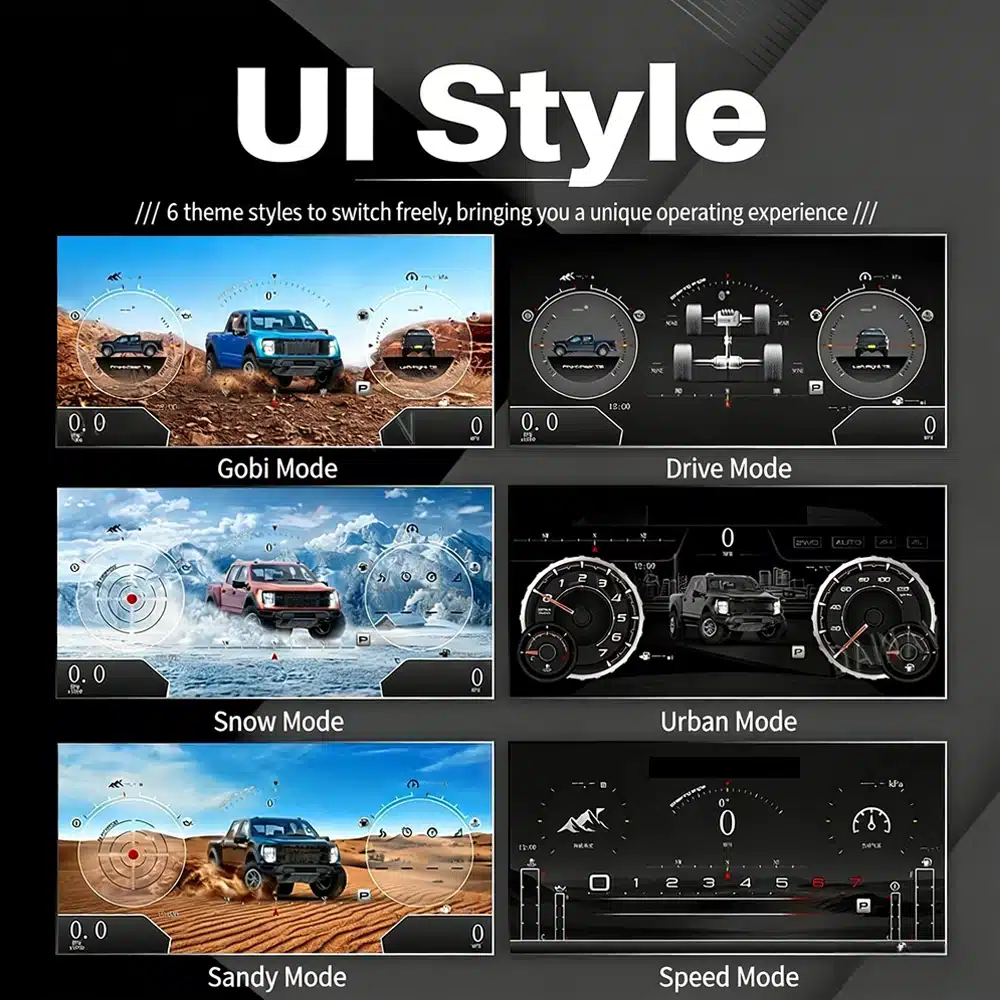
High-Definition UI Styles

Six Clear OEM-Style UI Views for Road and Off-Road Driving

This clear UI image replaces the low-resolution dial-switch image. The available styles include Gobi Mode, Drive Mode, Snow Mode, Urban Mode, Sandy Mode and Speed Mode, giving your F-150 or Raptor a more modern factory-style digital cockpit.

six clear UI styles for Ford F150 Raptor digital instrument cluster including Gobi Drive Snow Urban Sandy and Speed modes

Selectable Cockpit Themes

Switch Between Off-Road, Urban and Performance Views

The display can prioritize different information depending on how you use the truck: city driving, highway speed, desert driving, snow, sand, drivetrain status or daily vehicle information.

multiple digital gauge themes available on the Ford F150 digital cluster

CarPlay and Android Auto Map Information

Show Navigation Information in the Driver Display

When your connected CarPlay, Android Auto or Android head unit system supports output to the cluster, the instrument screen can present map and navigation information closer to your normal driving view.

Ford F150 digital cluster supporting CarPlay Android Auto and navigation map display information

Multilingual Interface

Use the Cluster in Your Preferred Language

The Linux interface supports multiple languages, including English, Spanish, French, German, Russian, Portuguese, Turkish, Korean, Chinese and Arabic. Ask iKAGOO about your preferred language when placing the order.

multilingual interface options for Ford F150 Linux digital instrument cluster

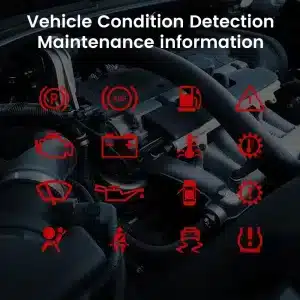
Warnings and Maintenance

Keep Important Vehicle Conditions Visible

Supported warning indicators, maintenance information and vehicle-status messages remain part of the driving experience, helping you notice issues without returning to the limited original display.

vehicle warning and maintenance indicators supported by the Ford F150 digital cluster

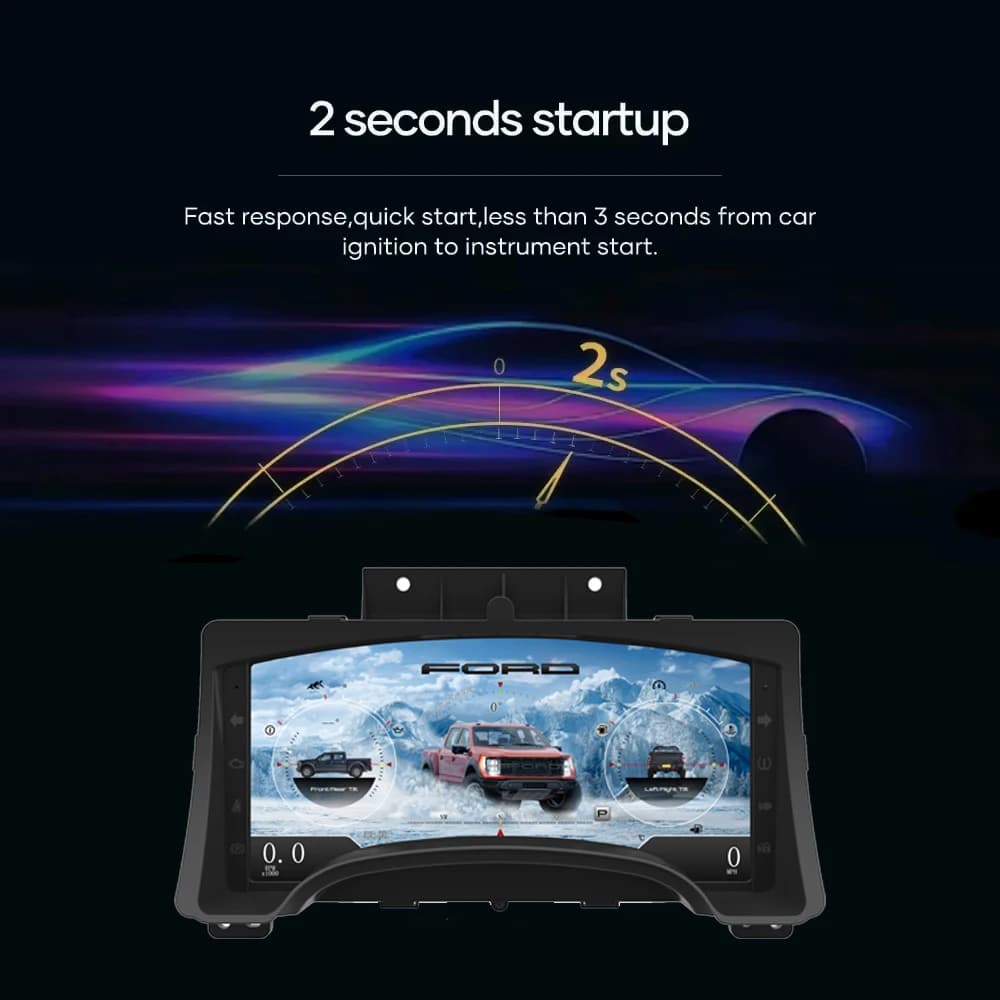
Fast Linux Startup

The Instrument Display Is Ready Within Seconds

A dedicated Linux platform keeps startup focused on driving information. The specified startup time is under two seconds after ignition.

fast startup screen for Ford F150 Linux digital instrument cluster

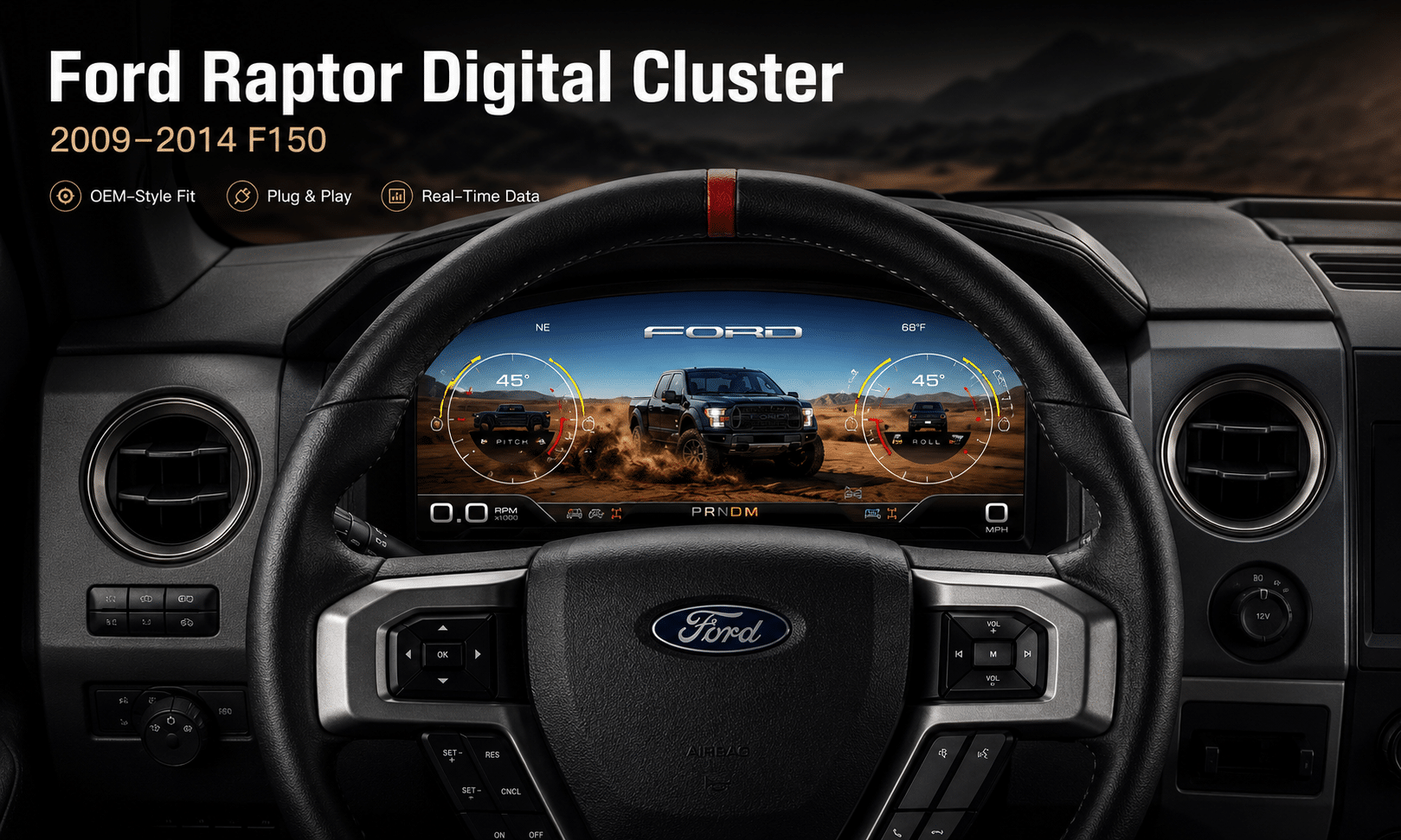
Installed Driving View

A Modern Driver’s View Without Rebuilding the Cabin

The wide screen sits behind the original steering wheel and within the existing dashboard architecture, creating a larger visual upgrade while leaving the center stack and surrounding interior intact.

Ford F150 digital instrument cluster installed in the original dashboard

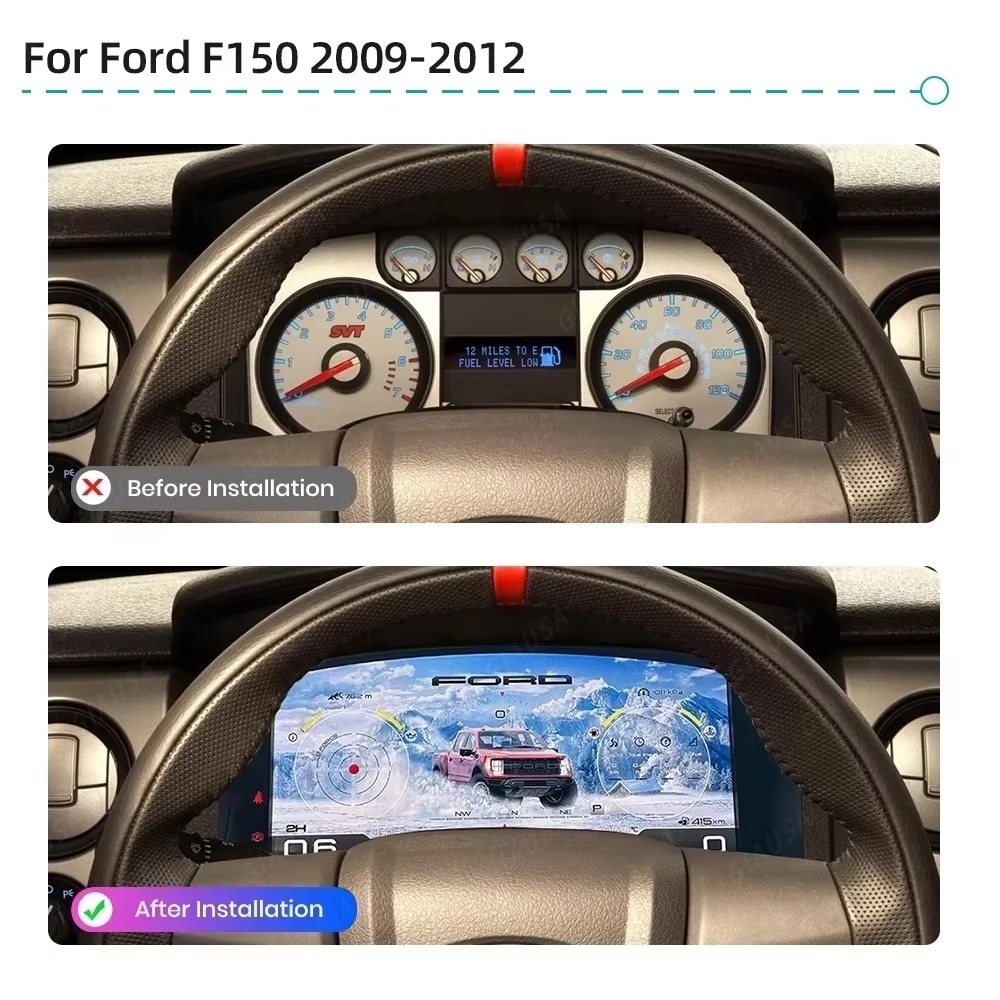
Before and After

See the Difference From the Same Driving Position

The original analog cluster provides basic information, while the digital replacement creates a wider, brighter and more configurable view directly in the driver’s normal line of sight.

before and after comparison of a 2009-2012 Ford F150 analog cluster and digital cluster

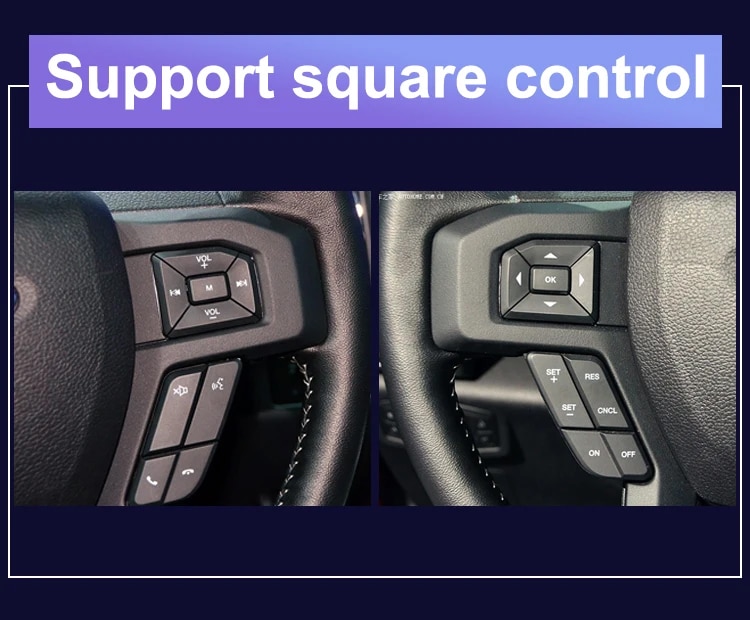
Factory Controls

Continue Using the Steering-Wheel Directional Controls

The supported factory arrow and OK controls let you move through cluster pages, settings and UI modes without adding an unrelated controller to the dashboard.

Ford F150 steering wheel controls supported by the digital instrument cluster

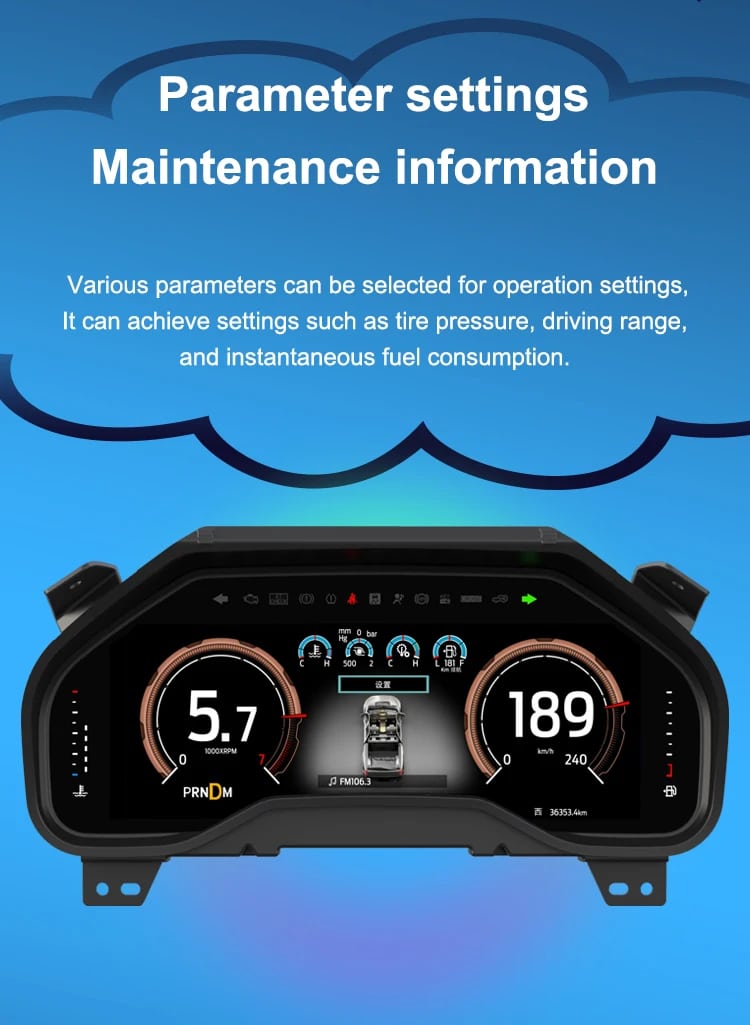
Données du véhicule

Bring Range, Tire Pressure, Oil and Fuel Information Into One View

The screen layout can vary by year version and selected theme, but the purpose is consistent: make supported vehicle, maintenance, off-road and navigation information easier to find during daily use.

digital cluster parameter settings and maintenance information interface

Feature Overview

A Focused Digital Cluster With Navigation Information Support

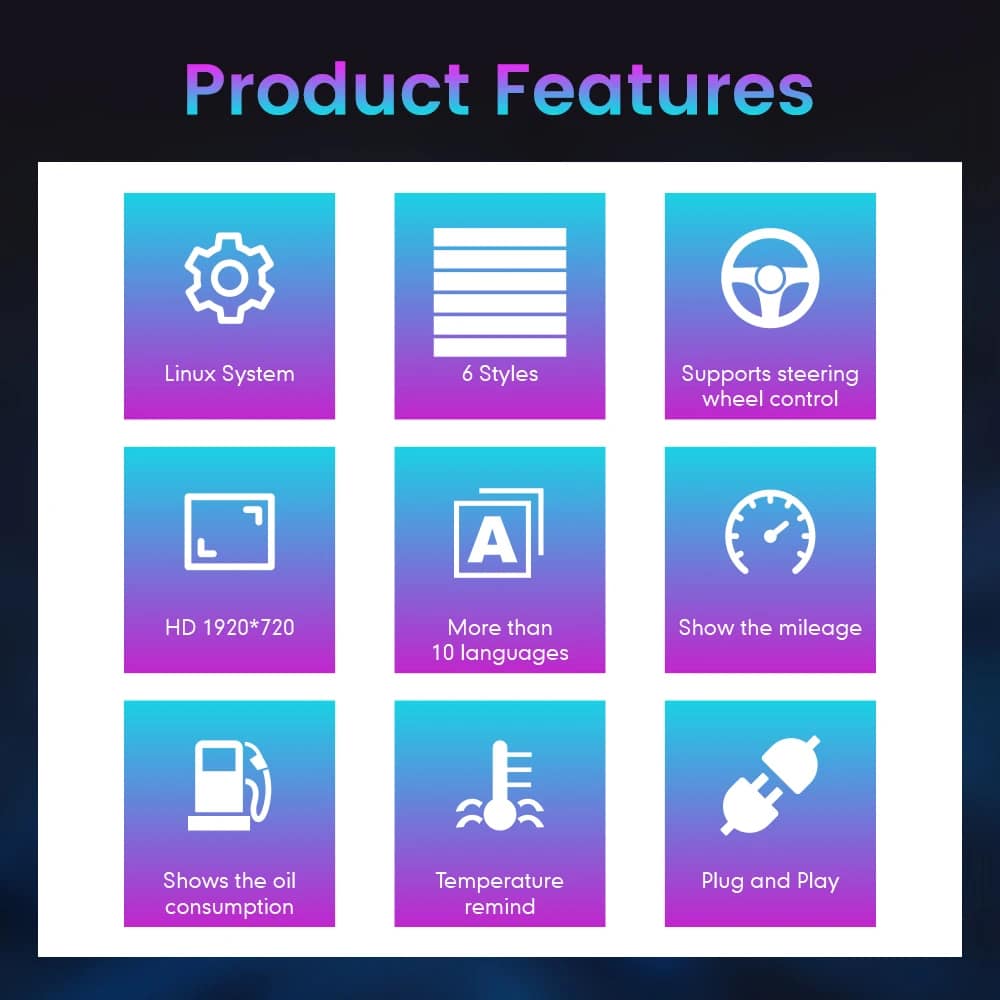
The cluster is built around Linux, selectable layouts, steering-wheel control, mileage display, vehicle-status information and supported CarPlay / Android Auto / Android head unit map information display. For your order, iKAGOO prepares the 13.1-inch, 1920 × 932 configuration stated in the purchase specifications.

feature overview for Ford F150 Linux digital instrument cluster with vehicle data and navigation information support

Vehicle and Regional Name Guide

Choose by Generation and Dashboard—Not Only the Badge Name

This cluster is built around the 12th-generation F-150 dashboard architecture. The purchase area currently provides two hardware groups because the original cluster structure changes across the production run.

2009–2012 Ford F-150

Select the 2009–2012 option and provide a clear photo of the original cluster. This includes matching trucks with the earlier gauge layout.

2013–2014 Ford F-150

Select the 2013–2014 option and provide the later original cluster photo so the correct physical version can be prepared.

2010–2014 Ford F-150 SVT Raptor

The first-generation Raptor belongs to this F-150 generation. Match by model year and original cluster appearance; there is no 2009 model-year SVT Raptor.

Ford Lobo / Lobo Raptor

Mexican-market badge names can refer to the same generation, but the dashboard, original cluster and connector configuration must match before ordering.

LHD and RHD-Converted Trucks

This product is prepared around the North American left-hand-drive dashboard shown. For an aftermarket RHD conversion, send full dashboard and steering-control photos before purchase.

2015–2020 F-150 / Raptor

Do not choose this 2009–2014 version. Use the separate 2015–2020 F-150 digital cluster page .
Before shipment, provide: model year, trim, market, engine/fuel type, original cluster photo, full dashboard photo, steering-wheel control photo, original Android head unit or CarPlay source information, and any previous wiring modification. This helps iKAGOO prepare the correct screen, connection solution and map-display guidance.

Caractéristiques techniques du produit

13.1-Inch Linux Virtual Cockpit Specifications

Type de produit Installation a posteriori d'un tableau de bord numérique / d'un tableau de bord LCD / d'un cockpit virtuel
SKU FD-123
Vehicle Options 2009–2012 F-150; 2013–2014 F-150
Raptor Application 2010–2014 first-generation SVT Raptor when dashboard and original cluster match
Écran 13.1-inch HD IPS display with anti-glare treatment
Résolution 1920 × 932
Système d'exploitation Linux
Processeur T5 quad-core, 1.5 GHz
Mémoire 1 GB RAM + 4 GB storage
Startup Under 2 seconds
Display Styles Six selectable OEM-style / Raptor-style UI themes
Navigation Information Supports CarPlay / Android Auto map information and Android head unit map mirroring when connected source supports output
Units Miles and kilometers
Tension de fonctionnement 9–16 V DC
Installation Method Matched plug connection, retained original instrument electronics where required, no intended cutting of supported factory main wiring
Package Weight 4,5 kg
Dimensions du colis 45 × 35 × 25 cm
The product is sold in two year-based versions, not RAM/storage variants. Select the correct model-year option in the WooCommerce purchase area and use the current displayed price there.

Préparation des commandes

How iKAGOO Prepares the Correct Cluster

Détails du véhicule

Provide the model year, trim, engine/fuel type and market.

Photos du tableau de bord

Send the original cluster and a full driver-side dashboard photo.

Year Version

We match the 2009–2012 or 2013–2014 hardware configuration.

Map Source Check

Confirm CarPlay, Android Auto or Android head unit map output before shipment.

Assistance à l'installation

After delivery, use the provided guidance and contact iKAGOO if the layout or map display behavior differs.

View Fitment Details

iKAGOO Purchase Evaluations

Three Practical Results for This Upgrade

Nécessité de la mise à jour d'iKAGOO

94/100 Arguments solides en faveur d'une mise à niveau
  • Large visual change from analog gauges
  • More useful information in the normal driving view
  • CarPlay / Android Auto map information support
  • Strong value for owners keeping the truck
Comment ce résultat est-il déterminé ?
This product is evaluated under the iKAGOO Upgrade Necessity framework, considering the factory system, daily-use improvement, long-term ownership value and practical alternatives.
Read the public evaluation framework

Compatibilité des véhicules avec iKAGOO Original

92/100 High Integration
  • Original steering controls supported
  • Vehicle data and warning integration
  • Year-specific physical architecture
  • Original instrument electronics retained as required
  • Supported navigation/map display from compatible source

A score of 92/100 does not mean that 8% of factory functions are lost. The score also reflects that the new Linux interface and menu structure differ from the original Ford analog cluster.

Comment ce résultat est-il déterminé ?
The result follows the iKAGOO Original Vehicle Compatibility framework covering function continuity, original controls, vehicle data, physical architecture, interaction and installation integration.
Read the public compatibility framework

Difficulté d'installation d'iKAGOO

Niveau 3 Bricolage avancé
  • Cluster and trim removal
  • Careful original-board transfer where required
  • Matched wiring connection
  • CarPlay / Android Auto / map display configuration
  • Complete function testing after installation

Suitable for an experienced DIY installer or an automotive electronics installer. The level describes the work required; it does not indicate lower product quality or lower upgrade value.

Comment ce résultat est-il déterminé ?
The level is assigned under the iKAGOO Car Electronics Installation Difficulty framework, considering disassembly, wiring, configuration and testing.
Read the public installation framework

Compare the Real Outcomes

Digital Cluster Upgrade vs Repair or a Used OEM Cluster

Decision Point
Repair Existing Cluster
Tableau de bord d'origine d'occasion
Primary result
Restores the existing analog experience
Replaces the unit with another factory-era cluster
Daily information view
Original layout remains
Depends on donor cluster type
CarPlay / Android Auto map information
Not added by repair
Not normally added by used OEM cluster
Off-road and Raptor-style display
Original display remains
Limited to factory-era layout
Vehicle-specific preparation
Repair-focused
Depends on the donor part selected
Support after purchase
Depends on repair provider
Depends on seller
Purchase conclusion: For an owner who only wants a failed gauge repaired, repair may be enough. For an owner who wants the F-150 or Raptor cabin to feel substantially newer, the iKAGOO digital cluster gives a stronger result: larger display, selectable Raptor-style UI, original vehicle data, steering-wheel controls and supported navigation/map information in the driver display.

Installation

Ford F150 Digital Cluster Installation: Level 3 Advanced DIY

This is not a simple USB accessory. Correct work requires careful trim removal, cluster removal, original-component handling, matched connection, CarPlay / Android Auto / Android head unit map source setup and complete function testing.

Recommended Installation Sequence

  1. Record the original mileage and photograph the factory cluster before disassembly.
  2. Disconnect the vehicle battery according to safe automotive-electrical practice.
  3. Protect the dashboard surfaces and remove the instrument trim and original cluster.
  4. Transfer the required original instrument board or related components exactly as instructed for your year version.
  5. Connect the matched harness and interface without forcing any connector.
  6. Confirm the CarPlay / Android Auto / Android head unit map source if this function is being used.
  7. Mount the digital cluster and restore power for initial setup.
  8. Select language, MPH/km/h and the applicable vehicle settings.
  9. Test speed, RPM, gear, fuel, temperature, TPMS, warnings, doors, steering controls, map display and sleep behavior.
  10. Complete final reassembly only after every supported function has been checked.

Shipping and Support

Vehicle-Specific Preparation With Clear After-Sales Coverage

Traitement des commandes

Normally 1–3 business days before dispatch, with additional time when vehicle information or configuration needs clarification.

Tracked Delivery

Typical delivery after dispatch: USA/Canada 5–9 business days, EU 7–15, UK/Australia 7–10, other supported regions 7–20.

12-Month Garantie

Eligible manufacturing defects and hardware failures under normal use are covered by the current limited hardware warranty.

Compatibility Remedy

When iKAGOO confirmed compatibility from accurate pre-purchase information but no reasonable solution works, the current published refund policy applies.

Questions des acheteurs

2009–2014 Ford F150 Digital Instrument Cluster FAQ

Does this cluster support CarPlay and Android Auto map display?
Yes. The cluster supports CarPlay / Android Auto map information display when the connected source system and configuration support output to the instrument cluster. Send your Android head unit or CarPlay source details before ordering if map display is important to you.
Can it show Android head unit map mirroring?
Yes. It can support Android head unit map mirroring when the paired Android system supports the required map-output connection. iKAGOO helps confirm this during vehicle and system matching.
What UI styles does this Ford F150 digital cluster include?
The cluster includes multiple OEM-style and Raptor-style UI views, including Gobi Mode, Drive Mode, Snow Mode, Urban Mode, Sandy Mode and Speed Mode. These layouts are designed for different road, performance and off-road driving situations.
Will the Ford F150 digital cluster keep my original mileage?
The installation is designed around retaining the required original instrument electronics and synchronizing the truck’s vehicle-specific data. Record the mileage before installation and follow the supplied board-transfer and setup instructions exactly.
Do I need FORScan or dealer programming?
This installation uses a retained-original-board method and normally does not require dealer flashing. The exact procedure depends on the year version and original cluster. Do not change module coding unless iKAGOO specifically instructs you to do so for your configuration.
Does it fit both 2009–2012 and 2013–2014 F-150 trucks?
Yes, but they use separate purchase options. Select the correct year group and send the original cluster photo because the physical layout and retained components are not identical.
Does this fit a 2009 Ford Raptor?
The F-150 generation began in 2009, but the first-generation Ford F-150 SVT Raptor began with the 2010 model year. A truck described as a “2009 Raptor” should be identified by VIN, model year and dashboard photo before ordering.
Will the factory steering-wheel controls still work?
Supported factory directional and OK controls continue to operate the cluster menus, settings and UI switching after correct connection and configuration. Send a steering-wheel photo if your buttons have been replaced or modified.
Does the cluster show TPMS, fuel range, oil and warning information?
Yes. The product supports tire-pressure information, fuel-use and driving-range information, supported oil and maintenance data, door status and warning indicators supplied by the vehicle.
Can I install it in a Ford Lobo or Lobo Raptor?
Some Mexican-market Lobo models share the same 12th-generation F-150 architecture. Compatibility must be determined from the model year, dashboard, original cluster and connector configuration—not the badge name alone.
What information should I send before ordering?
Send the model year, trim, market, engine/fuel type, original cluster photo, full dashboard photo, steering-wheel control photo, original Android head unit or CarPlay source information, and any known aftermarket wiring changes.

Ready to Upgrade

Make Your 2009–2014 F-150 Feel Modern Again

Choose the correct year version, send the requested vehicle photos and let iKAGOO prepare the matched digital cluster configuration, UI setup and map-display guidance for your truck.

Valider les informations relatives à mon véhicule

5.00

Basé sur les commentaires de 1
1
0
0
0
0

1 examen pour Ford Raptor Digital Cluster for 2009-2014 F150 | 13.1″ Linux Virtual Cockpit

  1. Michael Brown -

    Note totale
    Rapport qualité-prix

    Je l'ai installé sur mon Raptor 2009. Le mode ‘Off-road’ est absolument incroyable. En voyant l'inclinaison, les angles de roulis et la pression des pneus en temps réel sur l'écran HD de 13,1 pouces, les jauges analogiques de série semblent dater de l'âge de pierre. L'installation a été véritablement plug-and-play

    Pour :

    L'installation s'est faite sans problème, le menu est sans décalage, les effets visuels sont époustouflants et la résolution est extrêmement élevée

    Est-ce utile ?
Ajouter un commentaire

Your email address will not be published. Required fields are marked

Vous devez être connecté pour pouvoir ajouter des photos à votre avis.

Expédition, garantie, retours et service client iKAGOO
Service client iKAGOO

Livraison, garantie et retours

Des informations claires sur le traitement des commandes, la livraison à l'international, les produits spécifiques à chaque véhicule, l'assistance en matière de garantie, les retours et les colis endommagés.

Traitement de la commande En règle générale, 1 à 3 jours ouvrables avant l'expédition.
Livraison à l'international En général, entre 5 et 20 jours ouvrés après l'expédition, selon la destination.
Garantie du matériel Garantie limitée de 12 mois couvrant les défauts de fabrication éligibles.
Assistance spécifique au véhicule Une assistance en matière de compatibilité, de câblage et de configuration est disponible.

Questions fréquemment posées

Ces réponses constituent un résumé pratique. Les pages complètes consacrées aux conditions générales, accessibles via les liens ci-dessous, s'appliquent à toutes les commandes.

01

D'où les commandes sont-elles expédiées, et quel est le délai de livraison ?

La plupart des commandes iKAGOO sont expédiées depuis notre centre de distribution en Chine une fois que la configuration du produit et les informations relatives au véhicule ont été vérifiées. Le traitement normal d'une commande prend environ 1 à 3 jours ouvrables.

Les délais de livraison estimés après expédition sont les suivants :

  • États-Unis et Canada : environ 5 à 9 jours ouvrables
  • Union européenne : environ 7 à 15 jours ouvrables
  • Royaume-Uni et Australie : environ 7 à 10 jours ouvrables
  • Autres régions prises en charge : environ 7 à 20 jours ouvrables

Les délais de livraison estimés peuvent être affectés par les formalités douanières, les jours fériés locaux, les livraisons dans des zones isolées, les conditions météorologiques ou les retards des transporteurs.

02

Devrai-je payer des droits d'importation, de la TVA ou des frais de douane ?

Les frais d'expédition internationaux standard n'incluent généralement pas la TVA du pays de destination, les droits d'importation, les frais d'intermédiation ni les frais de dédouanement.

Pour les destinations éligibles au sein de l'Union européenne, une option Service d'expédition DDP peuvent s'appliquer. Les frais liés à l'importation ne sont inclus que si l'option DDP est sélectionnée lors du paiement ou confirmée par iKAGOO par écrit avant l'expédition.

Lorsque l'option DDP n'est pas sélectionnée, le destinataire est responsable de tous les frais perçus par les services douaniers locaux ou par le transporteur.

03

Puis-je demander une livraison express ?

Une livraison express ou accélérée peut être proposée pour certains produits et certaines destinations. La disponibilité, le transporteur et les frais supplémentaires sont confirmés avant l'expédition.

En fonction de la destination et du type de produit, iKAGOO peut faire appel à des transporteurs tels que DHL, FedEx, UPS, EMS, 4PX ou tout autre prestataire logistique proposant un service de suivi.

04

Comment puis-je suivre mon colis ?

Une fois la commande expédiée, le numéro de suivi ou le lien de suivi sera généralement envoyé à l'adresse e-mail utilisée lors de la commande.

Les mises à jour du suivi peuvent mettre plusieurs jours ouvrés à s'afficher lorsque un colis est transféré entre des transporteurs internationaux et locaux.

05

Quelle est la politique de retour et de remboursement d'iKAGOO ?

L'éligibilité au retour dépend du motif du retour, de l'état du produit, de son état d'installation, des justificatifs fournis et du fait que le retour ait été approuvé par iKAGOO.

Pour un retour de produit non défectueux, celui-ci doit normalement être inutilisé, non installé, complet et apte à la revente. Les frais de retour approuvés sont généralement à la charge du client.

Les frais de livraison initiaux, les frais DDP, la TVA, les droits de douane et les autres frais logistiques ne sont généralement pas remboursables, sauf si la législation en vigueur l'exige ou si iKAGOO en décide autrement.

Ne renvoyez pas un produit sans avoir reçu une adresse de retour validée et les instructions de retour de la part d'iKAGOO.

06

Que se passe-t-il si iKAGOO a confirmé la compatibilité mais que le produit ne peut pas être installé ?

Une protection supplémentaire peut s'appliquer si iKAGOO a confirmé la compatibilité avant l'achat, si le client a fourni des informations exactes sur son véhicule et s'il a coopéré en suivant les étapes raisonnables d'installation et de diagnostic.

Si iKAGOO confirme qu'aucune solution technique raisonnable n'est disponible et que le problème est signalé dans un délai de 7 jours calendaires après la livraison, le client peut bénéficier d'un remboursement du prix du produit sans être tenu de le retourner.

Les frais de livraison initiaux, les frais DDP, la TVA, les droits de douane et les autres frais facturés par des tiers ne sont pas inclus dans ce remboursement du prix du produit.

07

Quelle garantie offre iKAGOO ?

Les produits iKAGOO éligibles comprennent notamment un Garantie matérielle limitée de 12 mois couvrant les défauts de fabrication avérés et les pannes matérielles éligibles survenant dans des conditions normales d'utilisation.

Selon le problème, la solution peut inclure un diagnostic à distance, une aide à la configuration, des pièces de rechange, une réparation, le remplacement du produit, un remboursement partiel ou un remboursement intégral.

La garantie ne couvre généralement pas les dommages causés par un câblage incorrect, une modification non autorisée, un accident, une infiltration d'eau, un choc, une mauvaise utilisation, une tension inadaptée, une erreur d'installation ou l'utilisation d'équipements tiers incompatibles.

08

Le fait d'ouvrir le produit entraîne-t-il automatiquement l'annulation de la garantie ?

Une inspection ou un contrôle effectué par un tiers n'entraîne pas automatiquement l'annulation de l'intégralité de la garantie. Toutefois, les dommages résultant d'une réparation non autorisée, du remplacement de composants, d'une modification incorrecte, d'un court-circuit ou d'un remontage incorrect ne sont pas couverts.

Veuillez contacter iKAGOO avant de démonter ou de réparer le produit afin que la procédure de diagnostic appropriée puisse vous être fournie.

09

Que faire si ma commande arrive endommagée ou s'il manque des pièces ?

Contactez iKAGOO dans un délai de 7 jours calendaires après la livraison et conservez l'emballage d'origine, l'étiquette d'expédition, les accessoires et le produit.

Veuillez fournir des photos ou une vidéo nettes montrant :

  • Le carton d'expédition extérieur et l'étiquette d'expédition
  • Tout dommage visible sur l'emballage
  • Le produit et la zone concernée
  • Tous les accessoires et câbles reçus

Après vérification, iKAGOO pourra organiser l'envoi des pièces manquantes, le remplacement, la réparation, le remboursement ou toute autre solution raisonnable en fonction du cas particulier.

10

Que dois-je faire si j'ai commandé le mauvais produit ?

Veuillez contacter iKAGOO avant d'installer ou d'utiliser le produit. Un échange ou un retour pourra être accepté à condition que le produit n'ait pas été utilisé, qu'il n'ait pas été installé, qu'il soit complet et en état de être revendu.

Les frais d'expédition et toute différence de prix sont généralement à la charge des clients lorsqu'un produit, un modèle de véhicule, une année de fabrication ou une configuration d'usine erronés ont été sélectionnés.

Une étiquette de retour prépayée gratuite n'est pas fournie automatiquement.

11

Puis-je modifier ou annuler ma commande après le paiement ?

Contactez iKAGOO dès que possible, de préférence dans un délai de 12 heures après avoir passé la commande, lorsque vous demandez une adresse, une configuration de véhicule ou une modification de produit.

Une modification ou une annulation ne prend effet qu'après confirmation par iKAGOO. Les produits spécifiques à un véhicule peuvent faire l'objet d'un processus d'approvisionnement, de programmation, de test, de configuration ou de préparation sur mesure peu après le paiement.

Une fois que la préparation ou l'expédition a commencé, l'annulation pourrait ne plus être possible, ou les frais raisonnables déjà engagés pourraient être déduits.

12

Qu'est-ce qui est inclus dans le paquet ?

Le contenu de l'emballage varie en fonction du produit, du modèle de véhicule, du système d'origine et de la configuration choisie.

Selon le produit, le coffret peut contenir l'appareil principal, des faisceaux de câbles spécifiques au véhicule, une interface CANBUS, des adaptateurs, des câbles USB, des antennes, des microphones, du matériel de fixation et d'autres accessoires d'installation.

Veuillez consulter la page du produit concerné, les photos de l'emballage et la confirmation de commande pour connaître la liste exacte des éléments fournis.

13

Comment puis-je contacter le service d'assistance d'iKAGOO ?

Vous pouvez contacter iKAGOO via le formulaire de contact, par e-mail, sur WhatsApp ou via les canaux d'assistance disponibles sur le site web. Le délai de réponse habituel est de 24 heures ouvrables.

Pour bénéficier d'une assistance technique plus rapide, veuillez indiquer votre numéro de commande, le modèle et l'année de votre véhicule, fournir des photos du système d'origine, des photos du produit ainsi qu'une vidéo claire illustrant le problème.

Rendez-vous sur : Contact et assistance iKAGOO

14

Le paiement est-il sécurisé ? Existe-t-il des options de paiement échelonné ?

Les paiements sont traités via les moyens de paiement sécurisés affichés lors du processus de paiement. Les cartes, portefeuilles électroniques et options de paiement échelonné disponibles peuvent varier en fonction du pays, de la devise, du prestataire de paiement et de l'éligibilité du client.

Tout service de paiement échelonné, y compris les options proposées par PayPal ou un autre prestataire, est soumis aux règles de disponibilité régionale et d'approbation de ce prestataire.

Consultez l'intégralité des conditions générales d'iKAGOO

Veuillez consulter l'intégralité des conditions générales avant de passer commande, notamment en ce qui concerne les produits spécifiques à certains véhicules, les dispositions fiscales internationales et les retours liés à l'installation.

Cette FAQ est un guide simplifié destiné aux clients. En cas de divergence de formulation, les pages complètes des conditions générales publiées, la confirmation de commande et la législation applicable en matière de consommation prévalent.

Ford Raptor Digital Cluster pour F150 2009-2014 | 13.1" Linux Virtual Cockpit Ford Raptor Cluster numérique pour...

De : $1,380.00

Choix des options